AI agent pilots usually stall for operational reasons that have little to do with the model. Deloitte’s Tech Trends 2026 reports that 38% of organisations are piloting agentic AI, yet only 11% have agents in production. Four gaps explain most of that drop: no agreed test set, no access to real systems, no owner for exceptions and no idea what each task costs. Fix those before touching the model.
Here is each cause in one sentence:
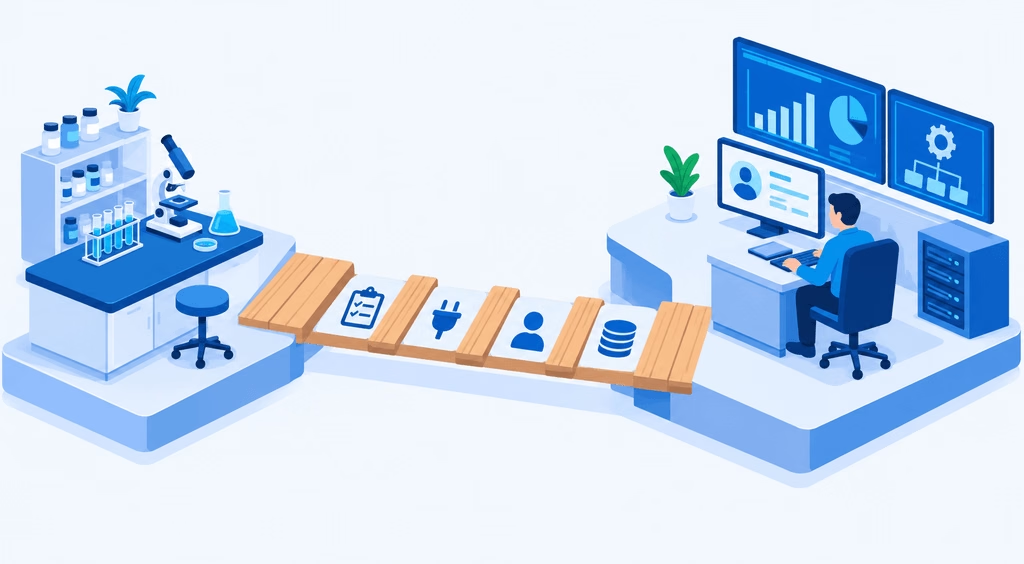
- No evaluation set: nobody agreed in advance what a correct outcome looks like, so nobody can sign off on accuracy.
- Integration left until last: the pilot ran on exported spreadsheets, and real access to the CRM or ERP, with its permissions and API limits, was never arranged.
- No exception owner: when the agent is unsure, there is no named person and no response time for the case it hands back.
- Unknown running cost: nobody measured cost per task, so finance cannot compare the agent with the way the work is done today.
What is an AI agent, in business terms?
An AI agent is software that reads a goal, decides which steps to take, calls tools such as your CRM, ERP, email or WhatsApp to carry them out, and asks a person when it is unsure. Underneath sits a large language model (LLM), the kind of AI model that reads and writes language. What turns it into an agent is the tools.
A model that only drafts text can embarrass you. One that can update a customer record or send a message can cost you money, so it needs the controls you would put around a new employee: limited access, supervision at first and a record of what it did.
| Approach | What it does | Where it breaks | Good fit when |
|---|---|---|---|
| Rule-based automation (for example an n8n, Make or Zapier workflow) | Runs fixed if-then steps when a trigger fires | Any input the rules did not expect, though it usually fails visibly | Inputs are structured and the process rarely changes |
| AI chatbot | Answers questions in a conversation, usually from a knowledge base | Can give a fluent wrong answer, but most cannot change records | The job is answering, not doing |
| AI agent | Chooses steps and tools to reach a goal, within permissions you set | Can take a wrong action in a live system, so it needs a test set, permission scopes and logs first | The work needs judgement on messy inputs and touches more than one system |
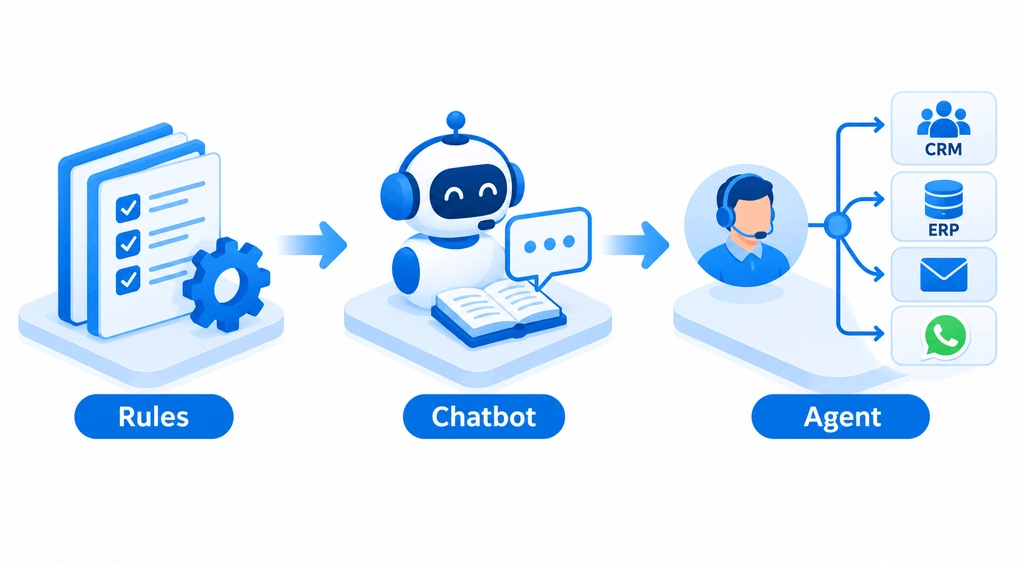
Most production setups mix the three, with rules for the predictable steps and the agent only where judgement is needed. If a step can be written as a rule, write it as one; it is cheaper and easier to audit. Our earlier piece on why manual workflows break as a business grows covers where that line usually falls.
Why can nobody sign off on the pilot’s accuracy?
Because nobody agreed what “correct” means before the agent was built. The demo was judged on how it felt.
The symptom: someone in operations tries an awkward real case, the agent gets it wrong, and the discussion turns into anecdotes. Without a shared yardstick, one bad answer outweighs fifty good ones.
The fix is an evaluation set: a fixed collection of real past cases, each with the outcome your best people would have chosen, used to score every version of the agent. Build it before you build the agent. Aim for 50 to 200 cases from recent months, including the messy ones: incomplete enquiries, duplicate customers, mixed languages. The people who do the work today should label the correct outcomes and add one line on why, which often helps the builders more than the label.
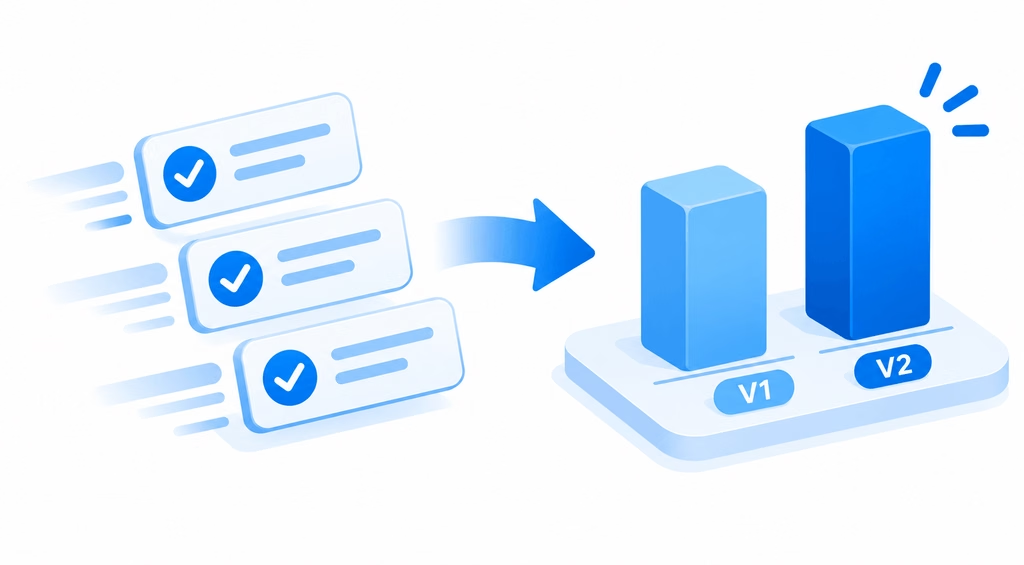
Agree a target score with the business owner in the first fortnight, plus the mistakes that count as critical whatever the score (updating the wrong customer, quoting the wrong price list). The agent goes live when it reaches that score on that set. Every version is scored against the same cases, so you can see whether a change helped. For more on scoring AI behaviour, see our guide to testing AI output before it reaches customers.
What does an AI agent need to connect to, and why does that break pilots?
It needs read and write access to every system the work touches, usually a CRM, an ERP, a messaging channel such as WhatsApp and email. Pilots break here because integration was left until last, and real systems come with permissions, limits and data quirks the pilot never met.
A typical pilot reads a CSV export and writes to a shared sheet, which proves the reasoning but not the job. In production, the agent needs a service account (a login of its own, separate from any person’s) in each system, with the narrowest permissions that work. It must respect rate limits, the caps most APIs place on requests per minute or per day, and cope with the CRM field everyone uses for something other than its label.
Work through each system and write down five things: what the agent reads, what it writes, which API or connector it uses, the rate limits, and who in IT approves the access. Then get a sandbox, a test copy of the system where the agent can write without touching real customers. WhatsApp Business API messages also follow Meta’s messaging policies, including when a business may start a conversation, so design the agent’s replies within them. An ERP without an API is the usual slow part; find out whether you
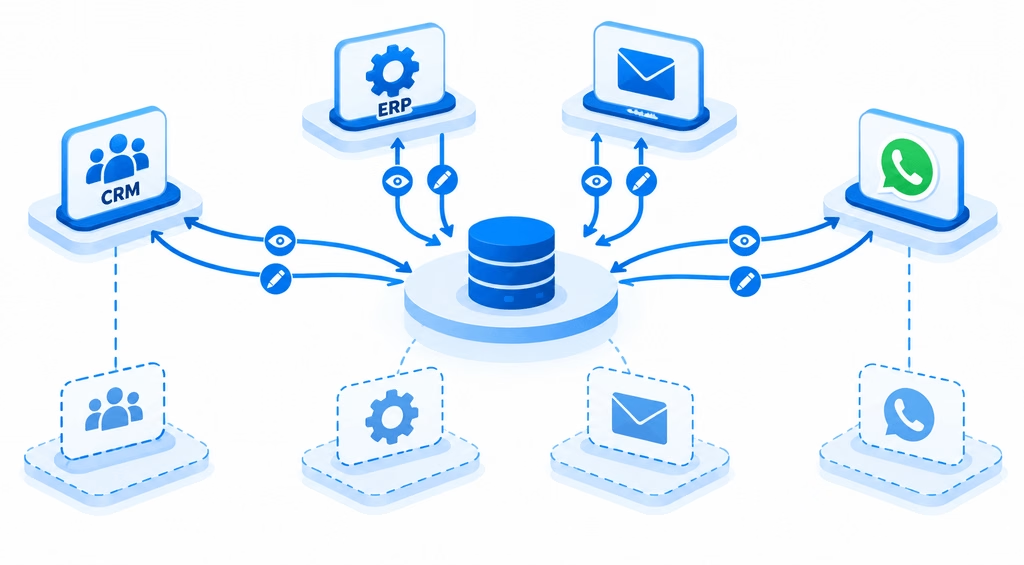
have one in week one, not week ten.
Who handles what the agent cannot decide?
A named person or team, with an agreed response time for each type of exception. Without that owner, the pilot quietly dies the first time a handed-back case sits unanswered.
In a pilot, the builder handles exceptions. In production that person has moved on, handed-back cases pile up in a shared inbox, a customer waits two days, and the team decides the agent is unreliable. It gets switched off for a reason unrelated to its accuracy.
Before launch, name the exception owner, give them a queue they already watch and agree response times by category. When the agent hands a case back, it should pass along what it was asked, what it tried and why it stopped, so nobody has to re-read the whole thread.
This is also where you decide when a human approves what the agent does. Tie approval to how reversible and how visible the action is:
| Action type | Approval at first live release | Later, if override rate stays low |
|---|---|---|
| Reading, searching, summarising | None | None |
| Drafting for a person to send | None | None |
| Updating internal records (CRM fields, notes) | Every write | Weekly sampling; keep approval for fields that feed billing |
| Messages to customers | Every message | Pre-approved message types go automatically; unusual ones still need approval |
| Money, pricing, credit, cancellations, deletions | Every action | Usually permanent, since these are hard to undo |
What will each task cost to run?
Nobody knows until it is measured, and you can measure it before launch with one formula:
Cost per task = model token cost + tool call cost + human review cost
Model token cost is what the LLM provider charges. Tokens are the small chunks of text a model reads and writes, usually billed per million at different rates for input and output. Agents use far more tokens than chatbots, because each step re-reads the instructions, the conversation and every tool result. Count tokens per task from your logs, not from one demo run.
Tool call cost covers paid services the agent uses, such as messaging charges or document reading services, plus a share of hosting.
Human review cost is minutes of review per task, times the share of tasks reviewed, times the reviewer’s loaded cost per minute. Early on it is often the largest term, and the one pilots leave out. It falls as you move from approving every action to sampling.
Keep fixed costs (monitoring, maintenance, support) separate, and compare both with what the work costs today. That is why the plan below starts by timing the current process.
How long does it take to put an AI agent into production?
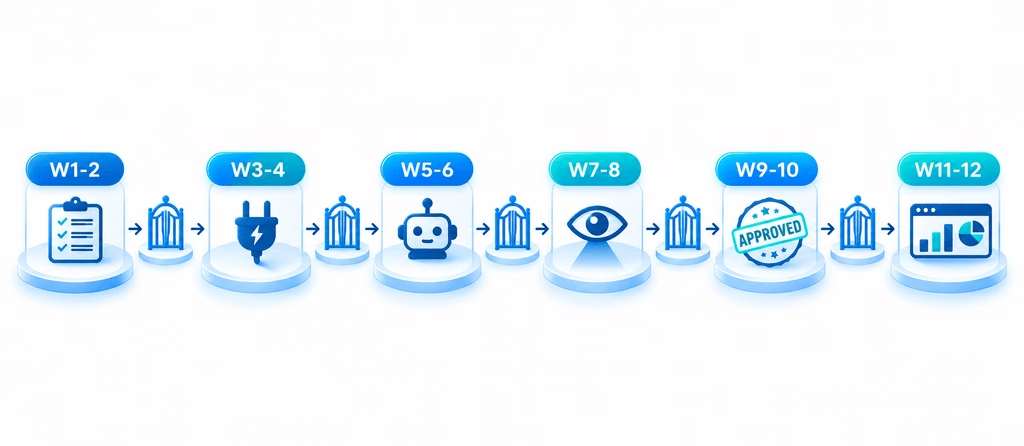
For one well-scoped agent working with systems that already have APIs, plan on 90 days: six fortnights of work plus about a week of slack. Add time if your ERP has no API, if the data needs cleaning first, or if the evaluation set cannot be built in two weeks, which usually means the process is not ready for an agent yet.
Each fortnight ends with a go/no-go check. A “no-go” means fix the gap before building the next fortnight on top of it.
- Weeks 1 and 2: scope and test set.
Pick one process and one goal. Define what the agent may and may not do, label 50 to 200 real past cases, name the business owner and exception owner, and time the current process. Output: a one-page scope, the evaluation set, the target score, critical errors and baseline cost and response time. Go/no-go: the business owner signs off the scope and the correct outcomes. If you cannot collect 50 labelled cases, choose a different process.
- Weeks 3 and 4: integrations in a sandbox.
Connect the agent to every system through its own service accounts in sandbox environments. Output: working read and write connections, the integration inventory and permission scopes. Go/no-go: the agent can read and write every record it needs within the rate limits, and IT security has approved the access.
- Weeks 5 and 6: first agent version and scoring.
Build the agent, score it against the evaluation set, fix the largest category of mistakes and score again. Output: version one, its score, an error breakdown and a first cost-per-task estimate. Go/no-go: the agent meets the target score with no critical errors.
- Weeks 7 and 8: shadow mode.
In shadow mode, the agent runs on live inputs and records what it would have done while people still do the work. Output: a daily comparison, reasons for disagreement and cost per task on real volume. Go/no-go: agreement with people on live cases is at or above the target, the exception owner keeps up with the volume, and finance accepts the measured cost per task.
- Weeks 9 and 10: limited live, with approval on every write.
Go live on a small slice, such as one region or one channel. Every system change and outbound message waits for a person to approve it. Output: live logs, override rates and an incident list. Go/no-go: the override rate is falling and below the agreed level, there is no open critical incident and the kill switch has been tested.
- Weeks 11 and 12: widen scope, monitoring and handover.
Remove approval for low-risk actions with a consistently low override rate, following the table above, and widen the slice. Output: the production release, monitoring and alerts, a runbook and a weekly override review in the calendar. Go/no-go: the business owner accepts the agent, and the support arrangement after launch is in writing.
Keep the slack week. Something in weeks 3 and 4 will overrun, usually an access request.
Pre-launch checklist
- Evaluation set of 50 to 200 real cases, signed off by the business owner
- Agreed score met, with no critical errors in the latest run
- Agent’s own service accounts, with the narrowest working permissions
- Rate limits known; the agent retries instead of failing silently
- Named exception owner, with response times by exception type
- Written approval rules: which actions need a person, and who approves
- Every action logged with input, decision, tool calls and result
- Kill switch tested by someone other than the builder
- Cost per task measured in shadow mode and accepted by finance
- Weekly override review booked, with an owner
How would a lead-qualification agent work, and how would you measure it?
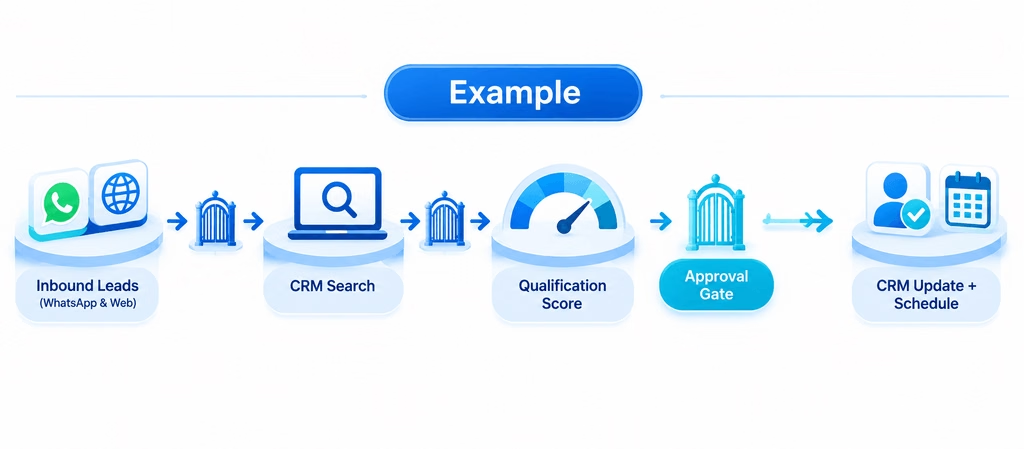
It reads incoming enquiries, scores them against your sales team’s criteria, updates the CRM and books calls, with a person approving its actions until the numbers justify trust.
For example, take a hypothetical B2B distributor of industrial supplies whose small sales team qualifies WhatsApp and web-form enquiries by hand while leads wait.
The inputs are WhatsApp messages through the WhatsApp Business API, web form submissions and any existing CRM record. The agent calls, in order: a CRM search for an existing account or open deal; an ERP read for the product lines and regions served; a scoring step against the sales team’s written criteria (business type, likely volume, region, timeline); a CRM write with the score and a short summary; a calendar lookup for a call slot with the right salesperson; and a reply to the enquirer.
The approval point sits on the writes. In weeks 9 and 10, the sales coordinator approves every CRM update and outbound message. After that, replies to qualified leads go out automatically as pre-approved message types. Marking a lead “not a fit” keeps a human approval permanently, because a wrong rejection loses revenue quietly.
Three metrics tell you whether it works:
- Response time: from enquiry received to first useful reply, compared with the baseline timed in weeks 1 and 2.
- Qualification accuracy: the share of evaluation-set cases where the agent’s score matches the sales team’s label, rerun on every new version, with new cases added each month.
- Human override rate: the share of the agent’s decisions that the approver changes, broken down by reason.
Each catches a failure the others miss: a fast agent can still be wrong, and one that scores well on old cases can drift on new ones. If you want this pattern applied to your own sales pipeline, our AI CRM automation page covers how CRM records can be updated from conversations.
What governance does an agent need from day one?
Four things: a log of every action, permission scopes, a kill switch and a weekly review of overrides. They are cheap at the start and expensive after an incident.
Deloitte’s State of AI in the Enterprise 2026 found that agentic AI adoption is outpacing the development of governance and oversight, with 23% of companies already using agentic AI at least moderately.
The action log records, for every task, the input, each tool call with its result, the decision and who approved it. It is how you answer a customer dispute and how the builder finds out why a mistake happened.
Permission scopes limit what the agent’s service accounts can touch. An agent qualifying leads has no reason to edit invoices, and it should never run on a person’s admin login.
The kill switch is a single action that stops the agent from writing anything and routes its queue back to people. A business user, not only a developer, should know where it is.
The weekly override review takes about half an hour with the exception owner, the business owner and the builder. Group the overrides by reason and decide, for each group, whether to fix the instructions, change a rule, add the cases to the evaluation set or keep that decision with a person. The evaluation set then grows from real mistakes. There is more on running automation in production in our AI automation articles.
When does it make sense to bring in an outside team?
When the idea is sound and the blocker is integration and controls work your team has no time for. If your developers know the CRM and ERP and have capacity, the plan works in-house.
Sigosoft builds AI agents and workflow automation connected to CRM, ERP and WhatsApp, and supports them after launch under a written SLA, with a 2-hour first response for critical issues. We sign an NDA before you share details, and you own 100% of the IP by contract.
Sigosoft is not the right fit if you only need a prompt library for staff or a no-code chatbot for website FAQs; a no-code tool or your own team will be faster and cheaper. No outside team can supply your business owner and exception owner either. If you have a stalled pilot, bring what you have on its test set, system access, exception owner and cost per task to the first conversation.
FAQ
Can we reuse our existing pilot, or do we start again?
Usually you keep the prompts, the use-case thinking and any test cases, then rebuild the integrations and controls. Pilots often run on exported data and a developer’s own login, which cannot go live. Score the old pilot against your new evaluation set in weeks 5 and 6; the number shows how much is worth keeping.
Does the agent need to run on a private or on-premise model?
Only if your data rules or customer contracts say the data must stay inside your environment. Check with legal and security in the first fortnight, because the answer changes hosting, cost and which models you can use. Businesses handling personal data of people in India should review their obligations under the Digital Personal Data Protection Act, 2023 first.
What if our ERP has no API?
Then integration takes longer, and it belongs at the start of the plan or before the 90 days begin. Common routes are read-only database views, a small integration service in front of the ERP, or the vendor’s import tools for writes. Avoid having the agent click through ERP screens to write data, because it breaks whenever a screen changes.
Who should own the agent inside the business after launch?
The business owner of the process, not IT or an innovation team. They own the evaluation set, the approval rules and the weekly override review. IT owns access and security, and the builder owns fixes under the support agreement. If nobody in operations will take that role, the agent is not ready to go live, whatever its score.
Thanks for the feedback!

Sajin Johnson Sigosoft team
Sajin Johnson is a Senior Consultant at Sigosoft. He works with business owners and operations teams to work out where AI and automation can take real work off their staff, and what it takes to connect AI agents to the ERP, CRM and messaging systems they already use. He writes about choosing technology partners and planning AI projects that hold up after launch.
Start the discussion
Questions or experiences to share? Our team reads and replies.