AI is now part of everyday business in the Gulf. Research by AWS and the UAE Artificial Intelligence Office found that 72% of UAE businesses used AI in 2026, but 47% were still at a basic level, using ready-made tools for routine tasks (Middle East AI News). A ServiceNow report found UAE organisations doubled AI spending year on year, yet siloed data and limited automation were slowing adoption across the enterprise (Khaleej Times).
The reason is simple: AI is only as useful as the data and workflows it can reach. When orders, stock, invoices and customers sit in separate tools, AI has nothing reliable to work with. The ERP is where those come together, so the ERP is where AI pays off.
This guide compares a traditional, off-the-shelf ERP with a custom AI-powered ERP. It covers how AI works inside an ERP, its key applications (business automation, workflow optimisation, predictive analytics, intelligent reporting and better decision-making), and how Sigosoft delivers a custom AI ERP that fits your business better than a traditional ERP provider, with examples from water delivery and healthcare.
Where traditional ERP falls short
Packaged ERP suites are powerful, but growing GCC businesses often run into the same problems:
- Licence costs that grow with headcount.
Per-user pricing makes it expensive to give drivers, sales reps and warehouse staff access, so they stay on paper or separate apps. - Your process bends to the software.
Standard workflows rarely match how a water distributor manages returnable bottles or how a pharmacy group moves stock between branches. - Customisation is slow and fragile.
Changes often need specialist consultants and can conflict with the next upgrade. - Field teams are an afterthought.
Desktop screens do not suit drivers invoicing at a customer’s door or staff checking stock on the move. - AI is bolted on, or missing.
General AI chat tools cannot see your stock, orders or ledgers, so they guess instead of acting on your data. - Compliance means extra add-ons.
E-invoicing, VAT categories and audit trails are often handled by separate tools and manual steps.
What a custom AI ERP does differently
In this guide, “custom ERP” means an ERP built around your processes, either from scratch or tailored on an open-source platform such as ERPNext or Odoo.
- Built around your workflow.
Modules match how you sell, deliver, stock and bill. - AI connected to live data.
AI works on your real orders, stock and ledgers, not on copies pasted into a chat window. - Automation across the business.
Approvals, notifications, follow-ups and reports run automatically, inside and beyond the ERP. - Mobile and field apps included.
Van sales, delivery, collections and approvals run on phones and sync with the ERP. - Compliance designed in.
VAT categories, e-invoice fields and audit trails are part of the core. - You own it.
The code and data belong to you.
How AI works inside an ERP
AI in an ERP is not one feature. It is a set of capabilities that read the ERP’s live data, suggest or prepare an action, and hand it to a person to approve.
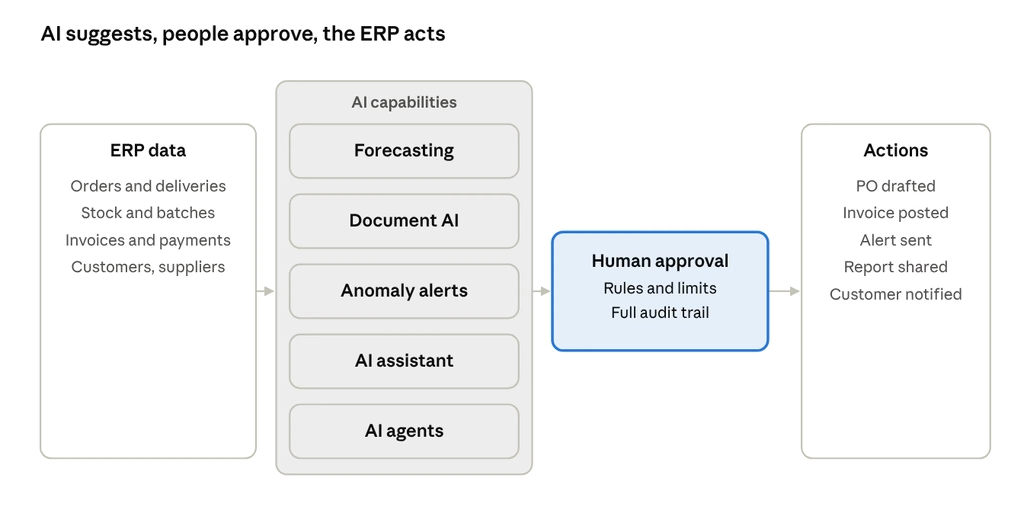
how AI works inside an ERP · data, AI, approval, action
AI reads live ERP data and prepares the next step; a person approves anything that changes stock, money or a submitted document, and the ERP carries it out.
- Forecasting and prediction.
Learns from your own sales, delivery and stock history to predict demand, reorder points and cash flow. - Document AI.
Reads supplier invoices, delivery notes, receipts and purchase orders, extracts the data and posts or matches it in the ERP. - Anomaly detection.
Watches transactions for unusual prices, discounts, credit notes, payments or stock movements, and flags them before they become losses. - AI assistant (copilot).
Lets staff ask the ERP questions in plain language, such as “which branches are low on this product?”, instead of building reports. - AI agents.
Carry out multi-step tasks, such as drafting a purchase order from a low-stock alert or chasing an overdue payment, within limits you set and with approval before anything is final.
The safeguard that matters: every AI action that changes stock, money or a submitted document goes through an approval step and is recorded in an audit trail. Sigosoft builds AI into the ERP this way, on ERPNext, Odoo, SAP or custom systems, through its AI ERP and Operations Automation service.
Key benefits and applications of AI in a custom ERP
The five areas below are where AI makes the biggest difference. For each, the contrast with a traditional ERP is shown, so you can see what changes.
1. Business automation
Routine work runs by itself, inside and around the ERP:
- Document entry: supplier invoices, delivery notes and receipts are read and posted automatically.
- WhatsApp ordering and notifications: customers order, confirm deliveries and receive invoices on WhatsApp, and the ERP updates. See WhatsApp Business API Integration.
- CRM follow-ups: leads, quotes, renewals and overdue payments are chased automatically. See AI CRM Automation.
- App-to-app connections: online stores, payment gateways and banks sync with the ERP, including through n8n, Make or Zapier. See n8n, Make and Zapier Automation.
- Customer self-service: order status and common questions answered by AI chatbots on WhatsApp, web or voice.
Traditional ERP: automation is limited to built-in rules; anything outside the suite needs separate tools. Custom AI ERP: automation is designed around your processes and reaches the channels your customers and staff actually use.
2. Workflow optimisation
AI does not just speed up steps; it helps redesign them:
- Smart approvals: purchase orders, discounts, credit notes and expenses routed by value, risk and role, with reminders and escalation.
- Bottleneck detection: shows where orders, approvals or deliveries wait longest, so you can fix the step that slows everything else.
- Exception-based work: staff handle only the cases AI flags, instead of checking every transaction.
- AI agents for multi-step tasks: for example, a low-stock alert becomes a draft purchase order, supplier quote request and approval request, within limits you set. See AI Workflow Automation Solutions.
Traditional ERP: fixed workflows that you configure once and work around. Custom AI ERP: workflows shaped to your business and improved as the data shows where time is lost.
3. Predictive analytics
AI learns from your own history to see what is coming:
- Demand forecasting: by product, route, branch or customer.
- Stock planning: reorder points that adjust to seasonality and promotions, with fewer stock-outs and less excess or expired stock.
- Cash-flow forecasting: expected collections and payments, so you can plan ahead.
- Customer insight: which customers are likely to reorder, slow down or pay late.
Traditional ERP: reports show what already happened; forecasting is often an extra module or a spreadsheet exercise. Custom AI ERP: forecasts sit inside daily screens, such as the purchase order or the route plan.
4. Intelligent reporting
Reports stop being a monthly chore:
- Reports on autopilot: daily, weekly and monthly reports generated and sent to the right people.
- Live dashboards: sales, stock, cash and operations on one screen. See Decision Intelligence Dashboards.
- Plain-language questions: managers ask “which branches missed target this week?” and get an answer, not a report request.
- AI summaries: the dashboard explains what changed and why it matters, not just the numbers.
Traditional ERP: standard reports, with custom ones built by specialists. Custom AI ERP: reports built around your KPIs, plus answers on demand.
5. Better, faster decisions
The sum of the four above is better decision-making:
- One version of the truth: sales, stock, finance and field data in one system.
- Early warnings: anomaly alerts on prices, discounts, payments and stock movements before they become losses.
- Scenario thinking: forecasts help answer questions such as “what if we add a route?” or “what if a supplier is late?”
- Decisions with a trail: every AI suggestion, approval and action is logged, so you can see why a decision was made.
Traditional ERP: decisions wait for reports and depend on who knows where to look. Custom AI ERP: the system brings the right information to the right person at the moment of decision.
For a wider view of what to automate first, read Sigosoft’s Business Process Automation Guide.
Traditional ERP vs custom AI-powered ERP: side by side
| What matters | Traditional (off-the-shelf) ERP | Custom AI-powered ERP from Sigosoft |
|---|---|---|
| Fit to your process | Standard workflows, changed through configuration or consultants | Built around your process from the start |
| Business automation | Built-in rules; outside channels need separate tools | Documents, WhatsApp, CRM, approvals and app integrations automated in one scope |
| Workflow optimisation | Fixed workflows | Smart approvals, bottleneck detection and AI agents for multi-step tasks |
| Predictive analytics | Historical reports; forecasting often an extra module | Demand, stock and cash-flow forecasts inside daily screens |
| Reporting | Standard reports; custom ones built by specialists | Automated reports, live dashboards, plain-language questions and AI summaries |
| Decision support | Depends on reports and manual checks | Early-warning alerts and a logged trail of every suggestion and approval |
| Control over AI | Varies by vendor | Approval steps and a full audit trail on every AI action |
| Field and mobile | Often limited or extra cost | Van sales, delivery and approval apps that sync with the ERP |
| E-invoicing | Depends on vendor updates and add-ons | Built into the invoice flow, connected to your accredited provider or ZATCA’s Fatoora |
| Cost model | Usually per-user licences plus implementation | Build and support cost; ERPNext has no per-user licence fees |
| Ownership | Licensed software | 100% IP yours by contract |
| Time to first value | Often a long implementation | First modules live in one to two weeks, then planned phases |
| Upgrades | Customisations can conflict with upgrades | Custom features kept as separate apps so upgrades stay safe (ERPNext) |
Sigosoft column based on Sigosoft’s published service commitments. Traditional ERP column describes common patterns, not any specific vendor.
Comparing ERP options? Tell us how you sell, deliver and bill today. We will send a roadmap with scope, timeline and cost. Get your free AI ERP roadmap
AI in action: water delivery and distribution
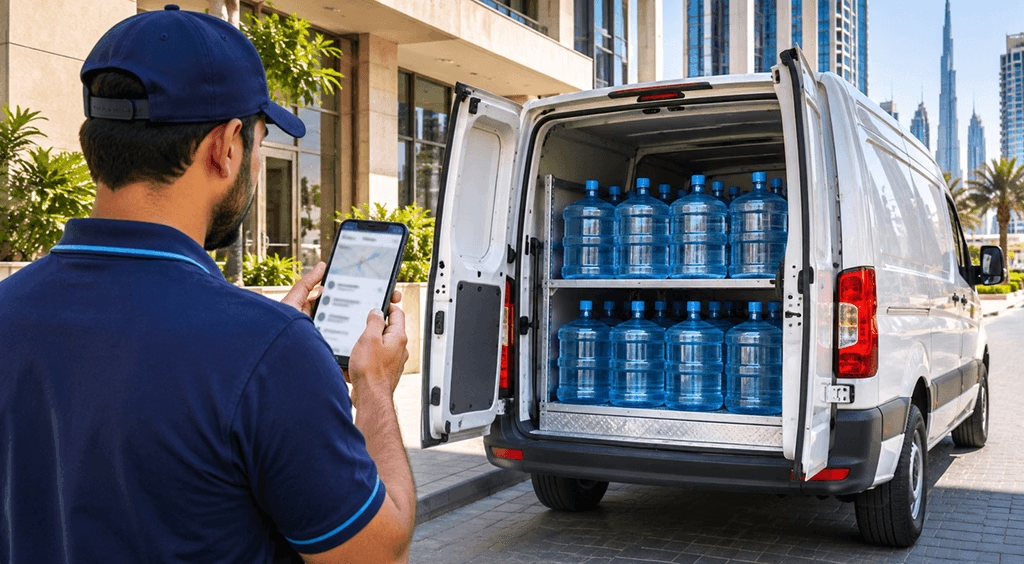
Water and beverage distributors run on routes, vans, returnable bottles and repeat orders. A custom AI ERP connects all of it:
- Demand forecasting by route and customer: predicts how many bottles each office, building and route will need, from your own order history, so vans leave loaded correctly.
- Automatic reorders and production planning: drafts purchase orders for bottles, caps and consumables near reorder level, for a manager to approve.
- Bottle and jar reconciliation: flags customers whose returned empties do not match deliveries, before deposits are written off.
- Driver cash and invoice checks: spots collections that do not match a driver’s invoices, or unusual discounts and credit notes.
- WhatsApp ordering and subscriptions: repeat orders, delivery confirmations and invoices handled automatically.
- Van sales on mobile: drivers take orders, deliver, invoice and collect payment, even offline, with automatic sync.
Proof: Sigosoft built Al Qaseem, a van sales and warehouse system for a drinking water business in Ajman, and the Aaban water delivery app in the UAE. See also Sigosoft’s Water Delivery Apps and Van Sales Apps.
AI in action: healthcare suppliers, pharmacies and clinics

Healthcare businesses juggle batches, expiry dates, branches, insurers and mixed VAT treatment:
- Expiry and reorder intelligence: suggests reorders from sales history and warns when batches near expiry, so stock is used, transferred or returned in time.
- Supplier invoice reading and matching: incoming invoices are read and matched to purchase orders and goods received; exceptions go for review.
- Branch transfers: central warehouse to branch pharmacy movements tracked by batch.
- Insurer and corporate billing checks: flags invoices that deviate from agreed prices.
- VAT category checks: flags lines where zero-rated, standard-rated or exempt treatment looks wrong before the invoice is sent.
- Plain-language questions: staff ask which branches are low on a product, instead of running reports.
Proof: Sigosoft built the bilingual English and Arabic Pulse-Julphar app and website for Julphar, a UAE pharmaceutical manufacturer, and builds telemedicine and clinic platforms.
Built-in compliance: GCC e-invoicing
A custom ERP treats e-invoicing as part of invoicing, not a separate project. The deadlines are close:
- UAE: businesses with revenue of AED 50 million or more go live on 1 January 2027; smaller businesses appoint an accredited provider by 31 March 2027 and go live on 1 July 2027 (ClearTax).
- Saudi Arabia: Wave 25 covers VAT revenue above SAR 187,500, with integration to ZATCA’s Fatoora by 1 February 2027 (KPMG).
- Oman: annual supplies above OMR 5 million from 1 April 2027; all other taxpayers from 1 October 2027 (Fonoa).
In the UAE, zero-rated supplies such as qualifying healthcare are inside the mandate (Sovos), so clinics and medical suppliers invoicing businesses need compliant systems too. Sigosoft is not an accredited service provider; it builds and integrates the ERP, POS and apps that connect to the provider or Fatoora route you choose.
Is your business ready for AI in the ERP?

AI depends on the data and rules behind it. Before switching AI on, check that you have:
- Clean master data: one record per customer, product and supplier, with correct tax numbers, units and prices.
- History in one place: at least several months of orders, deliveries and stock movements in the ERP, not spread across spreadsheets.
- Clear approval rules: who approves purchase orders, discounts, credit notes and payments, and up to what value.
- Defined access: which roles can see financial, customer and patient-related data.
- A first use case with a measurable outcome: for example, cutting manual invoice entry or reducing stock-outs on one route or branch.
- A data privacy and security baseline: where data is stored, who can reach it, and how AI processing is governed.
Measuring the value of AI and automation
Agree the measures before go-live and track them monthly:
- Time saved: hours spent on manual data entry, invoice matching and report building.
- Stock health: stock-outs, expired stock written off and excess stock held.
- Cash: days to collect payment and value of overdue invoices.
- Accuracy: invoice errors, credit notes issued and e-invoice rejections.
- Speed: time to close the month and time from order to delivery.
- Adoption: share of orders captured on mobile and share of AI suggestions accepted.
Sigosoft’s Decision Intelligence Dashboards put these on one live screen for management.
How Sigosoft delivers your custom AI ERP
Sigosoft’s approach, as published on its ERPNext and AI ERP service pages:
- Discover (days 1–2): goals, users and scope, with a roadmap in two hours.
- Prototype (days 3–5): screens and workflows your team can try.
- First release (weeks 1–2): AI-accelerated build, every line reviewed by senior engineers.
- Grow and support (ongoing): new modules, AI use cases, monitoring and SLA-backed support.
What you get with Sigosoft compared with a traditional ERP rollout:
- One team for ERP, AI and automation: ERPNext, Odoo or fully custom ERP, AI ERP automation, AI agents and workflow automation, and business process automation.
- AI inside the ERP you already run: Sigosoft can add AI to an existing ERPNext, Odoo, SAP or custom system without a rebuild, or build a new one.
- AI you can trust: connected to your data, with approval steps and a full audit trail.
- Field apps included: van sales, ERPNext mobile and water delivery apps that sync with the ERP.
- Upgrade-safe customisation: custom features built as separate Frappe apps on ERPNext.
- Migration from Tally, spreadsheets or older systems, with data verified before go-live.
- Security and ownership: ISO/IEC 27001:2022-certified practices, 100% IP yours by contract, a named manager and Managed Software and AMC support.
Sigosoft vs a traditional ERP provider
| Traditional ERP provider | Sigosoft | |
|---|---|---|
| Starting point | Their product, configured to fit | Your business requirements, built or tailored to fit |
| Platform choice | One product | ERPNext, Odoo, an existing ERP (including SAP) or fully custom |
| AI | Vendor’s roadmap and add-ons | AI designed for your use cases: forecasting, document AI, anomaly alerts, assistants and agents |
| Automation beyond ERP | Usually out of scope | WhatsApp, CRM, chatbots, workflow tools and dashboards in the same team |
| Field apps | Separate vendor or extra licences | Mobile, van sales and delivery apps built by the same team |
| Speed | Long implementation programmes | Roadmap in two hours, prototype in days, first modules in one to two weeks |
| Ownership | Licence and subscription | 100% IP yours by contract |
| Support | Ticket queues and partner tiers | Named manager and SLA-backed support |
Traditional provider column describes common patterns, not any specific company.
Want to see what AI could automate in your business?
Send us your top three manual processes. We will map where AI and automation fit, with scope, timeline and cost. Get your free AI ERP roadmap
Frequently asked questions
What is the difference between a custom ERP and a traditional ERP?
A traditional ERP is a packaged product you configure to fit, usually under per-user licences. A custom ERP is built around your processes, from scratch or on ERPNext or Odoo, and includes the AI, mobile apps and integrations your business needs.
How is AI used in an ERP?
Mainly for forecasting demand and stock, reading documents such as supplier invoices, flagging unusual transactions, answering staff questions in plain language, and running multi-step tasks as AI agents with approval.
What are the main benefits of AI in an ERP?
Five stand out: business automation, workflow optimisation, predictive analytics, intelligent reporting and better, faster decisions, all built on the ERP’s live data and controlled through approvals.
How is Sigosoft different from a traditional ERP provider?
Sigosoft starts from your requirements rather than a product. It builds or tailors the ERP on ERPNext, Odoo, an existing system or custom code, adds AI and automation designed for your use cases, builds the mobile apps, and hands you full IP ownership with SLA-backed support.
Can AI be added to the ERP we already use?
Yes. Sigosoft adds AI to existing ERPNext, Odoo, SAP or custom systems without rebuilding them.
Is AI in the ERP safe for financial and patient-related data?
It should run with role-based access, approval steps and an audit trail, under a defined security policy. Sigosoft works under ISO/IEC 27001:2022-certified information security practices.
Is a custom ERP more expensive than a packaged ERP?
It depends on scope. A custom ERP has a build cost but, on ERPNext, no per-user licence fees, which matters when drivers and field staff need access. Sigosoft provides a scoped roadmap with cost before work starts.
How long does implementation take?
Sigosoft’s published approach puts first modules live in one to two weeks, followed by planned phases.
Will the ERP be ready for GCC e-invoicing?
Yes, if e-invoicing is part of the scope. Sigosoft builds the invoice flow and connects it to your accredited provider in the UAE or Oman, or to ZATCA’s Fatoora in Saudi Arabia.
Ready to run your business on an ERP that works for you, not the other way round? Talk to Sigosoft or explore AI ERP and Operations Automation.
Related reading
- Business Process Automation Guide for Modern Businesses
- AI Workflow Automation: Solving Manual Challenges
- Distribution Business Automation Cost in India and the UAE (2026)
- Water Delivery Software: Proven Cost Guide
Thanks for the feedback!

Praveen Soman CEO, Sigosoft
Technology entrepreneur and digital product strategist with a passion for building scalable software products and solving real-world business challenges. Enjoys exploring AI, emerging technologies, startups, and the ideas shaping the future of technology.
Connect on LinkedIn →Start the discussion
Questions or experiences to share? Our team reads and replies.