
If your business already uses a custom ERP, you have probably spent years shaping it. It knows how you price, how your branches bill, how stock moves between warehouses and how your accountants close the month. Then UAE e-invoicing appeared on the board agenda, and a hard question followed: do we have to replace all of this?
In many cases, you don’t. A lot of businesses can extend the ERP they already have to support UAE e-invoicing instead of replacing it. Whether that works for you depends on three things: how the system is built, how complete your invoice data is, and how easily the ERP can exchange data with another system.
We build and modernise custom business software at Sigosoft, so we look at this question from inside the system. Before recommending a replacement, we would first examine the ERP you already run. This article explains what we would look for, what the integration usually involves, and where the real risks sit. It reflects the rules published up to November 2026. For how those rules apply to your own transactions, please speak to your tax advisor.
What UAE e-invoicing changes for a business that already has an ERP
The important thing to understand is that the law does not ask for a particular ERP. It asks for your invoice data to leave your system in a structured format and travel through an Accredited Service Provider (ASP). Your ERP never connects to the Federal Tax Authority (FTA) itself. The ASP does that.
So the real question for an existing ERP is narrower than most people fear. Can it produce complete invoice data, pass that data to an ASP, and act on the responses that come back?
The rules your ERP has to work with
The legal base is Ministerial Decision No. 243 of 2025, which sets up the Electronic Invoicing System, and Ministerial Decision No. 244 of 2025, which sets the rollout. Ministerial Decision No. 197 of 2026 has since amended Decision 243. The Ministry of Finance (MoF) explains how it all works in the UAE Electronic Invoicing Guidelines. The current version is v2.0, dated 26 October 2026.
For an ERP project, these are the points that shape the work:
- Scope.
E-invoicing applies to businesses in the UAE whether or not they are VAT registered, subject to the exclusions in Decision 243. Supplies to private individuals who are not in business are outside the system for now. A future decision could change that, so design your invoice logic so B2C can be added later. - Format.
Invoices follow PINT AE, the UAE version of the Peppol International invoice model, built on UBL 2.1. For in-scope transactions, the structured e-invoice becomes the invoice, not the PDF you email. - One ASP per business.
Each business onboards with one ASP, which handles both sending and receiving. - Timing.
Advisers’ summaries of Decision 243 put the window for issuing an e-invoice at 14 days from the transaction. Confirm how that applies to your billing cycle with your tax advisor. - Storage.
The guidelines set retention at five years for most businesses, seven years for real estate records, and four more years during a dispute or audit. Decision 197 removed the earlier requirement to store e-invoice data inside the UAE. Wherever you store it, keeping the records remains your responsibility, not your ASP’s.
UAE e-invoicing deadlines for 2027
| Group | Appoint an ASP by | Go live by |
|---|---|---|
| Revenue of AED 50 million or more | 30 October 2026 (passed) | 1 January 2027 |
| Revenue below AED 50 million | 31 March 2027 | 1 July 2027 |
| Government entities | 31 March 2027 | 1 October 2027 |
A voluntary pilot has been open since 1 July 2026. A business set up after these dates must appoint an ASP and complete onboarding before it issues its first invoice.
If you are below AED 50 million, the next few months are the realistic window to prepare the ERP before you choose and test with an ASP. If you are above it and still have no ASP, you are already behind, and your go-live date has not moved.
Penalties and ASP accreditation
Cabinet Decision No. 173 of 2026, announced on 30 October 2026, replaced the earlier penalty decision. Failing to implement e-invoicing, which includes not appointing an ASP, costs AED 5,000, then AED 5,000 for each further month, up to AED 50,000 in any 12 consecutive months. This now applies to buyers as well as sellers. Each e-invoice or e-credit note not sent through the system costs AED 100, up to AED 5,000 a month.
ASPs are now accredited directly. Ministerial Decision No. 168 of 2026, in force from 1 October 2026, removed the earlier pre-approval stage. Before you sign with a provider, check it on the MoF’s current list of accredited ASPs.
How an invoice travels from your ERP: the five-corner model
The UAE uses a Peppol-based model with five participants, usually called corners:
- You, the supplier.
Your ERP creates the invoice data. - Your ASP.
It validates the data, converts it to PINT AE if needed, and sends it. - Your customer’s ASP.
It receives and checks the invoice. - Your customer.
Their system receives the e-invoice. - The FTA.
It receives tax data from both ASPs in near real time.
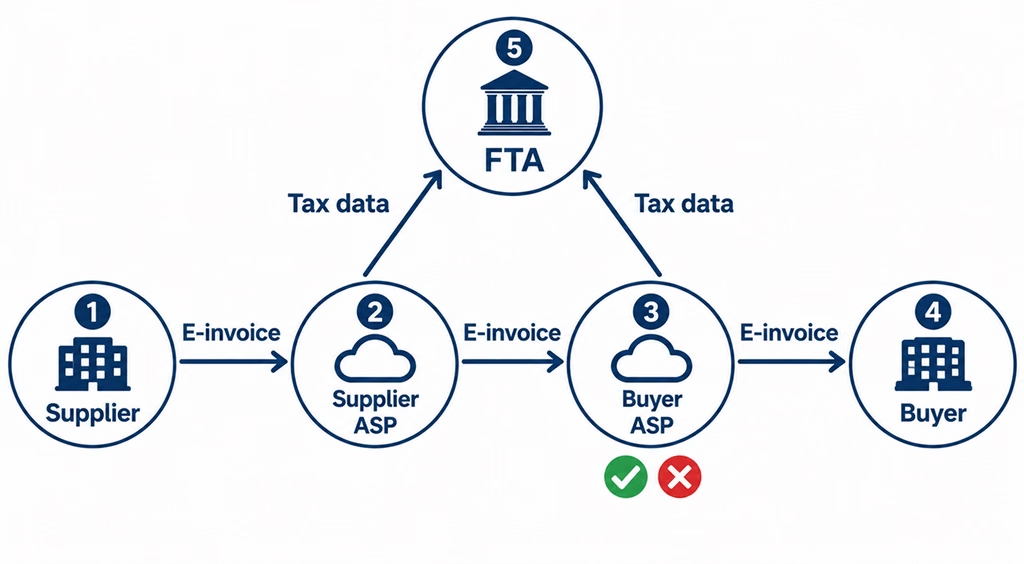
The FTA does not approve each invoice before it counts. It receives the data and monitors it. The checking happens at the ASPs. That is why data quality inside your ERP matters so much: if a field is missing or wrong, the invoice fails at the ASP, and your team has to notice and fix it.
Your ERP also plays two roles. It is corner 1 when you invoice your customers and corner 4 when your suppliers invoice you. Many projects plan only the sales side. Then structured supplier invoices start arriving and nobody has decided how they reach accounts payable.
Confirmations flow back too. When tax data is reported successfully, the FTA sends a confirmation to both ASPs, and they pass it on to the seller and the buyer. Your ERP should store these confirmations against each invoice, so anyone can see where a document stands without logging in to the ASP’s portal.
Questions we hear from businesses with custom ERPs
The regulations explain what must happen. They don’t tell you what to do with a system that was built for your business ten years ago by a team that may no longer be around. These are the questions that decide how an integration project actually goes.
What if our ERP is 5 to 10 years old?
Age alone is not a reason to replace an ERP. Plenty of older systems are stable, well understood by the people who use them, and full of business rules nobody wants to rebuild. What matters is whether the system can be changed safely.
Older custom ERPs tend to fall into a few groups. Some are desktop applications with a local or on-premises database. Some are web applications built on older PHP or .NET versions. Some sit on databases such as SQL Server, MySQL or Oracle that have grown over the years with tables nobody fully documents. Many have no modern API at all.
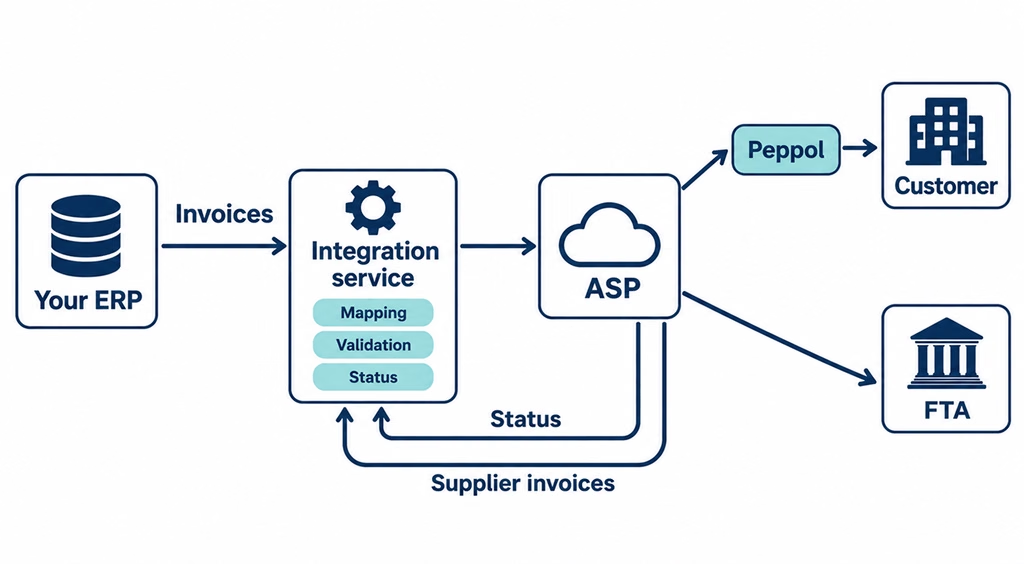
For most of these, we would not touch the core ERP more than necessary. Our approach would be to build a separate integration service that sits beside the ERP. It reads finalised invoices, turns them into the data your ASP needs, sends them, and writes the status back. The old system keeps doing what it does well, and the e-invoicing logic lives in modern code that is easier to test, secure and update when the rules change. Later, if you decide to modernise or migrate the ERP, that integration service moves across with it.
What if our ERP has no API?
This is common, and it is solvable. Before choosing an architecture, a development team should understand three things:
- How invoices are created today.
Which screens, stored procedures or batch jobs create an invoice, and at what point it becomes final. - Where the data lives.
Which tables hold invoice headers, lines, customers, tax codes and currencies, and how they relate. - What integration options exist.
Export features, scheduled reports, database views, message queues, or the ability to add a small API to the existing application.
With that picture, there are usually a few safe options. We might add a lightweight API layer to the existing application. We might create read-only database views that expose finalised invoices to a middleware service. Or we might use the ERP’s own export, if it is reliable. What we avoid is having an outside service write directly into the ERP’s core tables. That bypasses the application’s own rules and makes problems hard to trace. Status updates should flow back through a controlled route, such as a dedicated status table or an API endpoint the ERP owns.
The ASP side is usually the simpler half. Most ASPs accept invoice data through a REST API or file exchange and handle the Peppol transport themselves. Our guide to API development explains the general principles we follow when designing and securing these connections.
How do we handle multiple branches and legal entities?
Branches and entities create most of the hidden work in a UAE e-invoicing ERP integration.
Start with the legal structure, because the rules follow legal entities, not branches. Each business has a 10-digit Tax Identification Number (TIN), taken from the first 10 digits of its 15-digit TRN. That TIN becomes its identity on the Peppol network. Branches of one company share it. Separate companies, including members of a VAT group, each have their own, and group members may even use different ASPs. Revenue thresholds are also assessed per entity, so two companies in the same group can have different deadlines.
Inside the ERP, that raises practical questions. Do branches use separate invoice number series? Are those numbers unique within each legal entity? Is the same customer stored three times with three spellings and one TRN? Does each entity have its own tax configuration, especially if one trades from a free zone? For VAT groups, intra-group transactions are in scope, but the guidelines give a 24-month grace period from 1 January 2027 on timing. Your ERP should be able to tell intra-group sales from external ones.
What about invoices from our suppliers?
E-invoicing is not only about what you send. Once your suppliers are live, their invoices reach you through your ASP as structured data. That is good news if your ERP is ready, because it removes a lot of manual typing.
A well-built inbound flow takes each supplier e-invoice from the ASP, finds the supplier in your ERP, and matches the invoice to the purchase order and goods receipt. Exceptions, such as price differences, quantity mismatches or unknown suppliers, go to a short review queue instead of a full manual process. Your approval workflow may need adjusting, because the e-invoice, not a scanned PDF, is now the document your team approves.
If you skip this, the e-invoices still arrive, but someone downloads them from the ASP portal and re-keys them. You meet the rule and lose most of the benefit.
Will the integration disrupt our daily operations?
It shouldn’t, if it is planned properly. Most of the change happens behind the screens your team already uses. Sales staff still raise invoices the way they do today. The differences are a few new mandatory fields on customer and item records, an invoice status they can see, and a queue for rejected invoices.
The disruption usually comes from data cleanup, not from code. Collecting missing customer TRNs, fixing addresses and splitting tax codes takes time from the finance team. Starting early spreads that effort over weeks instead of the final month.
We would also keep inventory and accounting logic untouched where possible. E-invoicing reads from the invoice once it is final. It should not change how stock is reduced or how revenue is posted. Testing in the pilot, then running a short parallel period, lets your team see the new statuses before any penalty applies.

What happens when an e-invoice is rejected?
Consider a business that issues an invoice to a new trade customer. The sales team created the customer quickly and left the TRN empty and the address in one free-text line. The ERP finalises the invoice and the integration service sends it to the ASP. Validation fails: a required buyer identifier is missing.
Under the guidelines, when validation fails at the buyer’s ASP, it reports the failure back to your ASP and to the FTA, and no tax data is reported for that invoice. Your ASP passes the failure to you. What happens next depends on your ERP. In a well-integrated system, the invoice shows as “Rejected” with the reason in plain language. It lands in a queue for the person responsible for customer data. They update the customer record, and the invoice is resent. Every attempt is logged.
The guidelines do not set out a single resubmission procedure. Agree with your ASP how a failed invoice is corrected and resent, and write it into your process. Once an invoice has been accepted, corrections work differently. You make them through an e-credit note or an additional invoice, not by editing the original.
Two more cases are worth planning for. If your customer is not yet onboarded to e-invoicing, the guidelines give predefined endpoints to use, and that customer may still need a PDF tax invoice. And if an invoice is out of scope of VAT, it uses a different invoice type code (480) and must carry the buyer’s identification. Your ERP’s logic has to choose correctly.
How Sigosoft approaches UAE e-invoicing ERP integration
To be clear about our role: Sigosoft is a software development company. We are not an Accredited Service Provider, and we do not give tax advice. We work on the ERP and integration side, so that your system produces the right data, talks to your chosen ASP, and lets your team manage the results. Your tax advisor interprets the rules. Your ASP handles the Peppol network and reporting to the FTA.
This is how we would run the project, step by step.
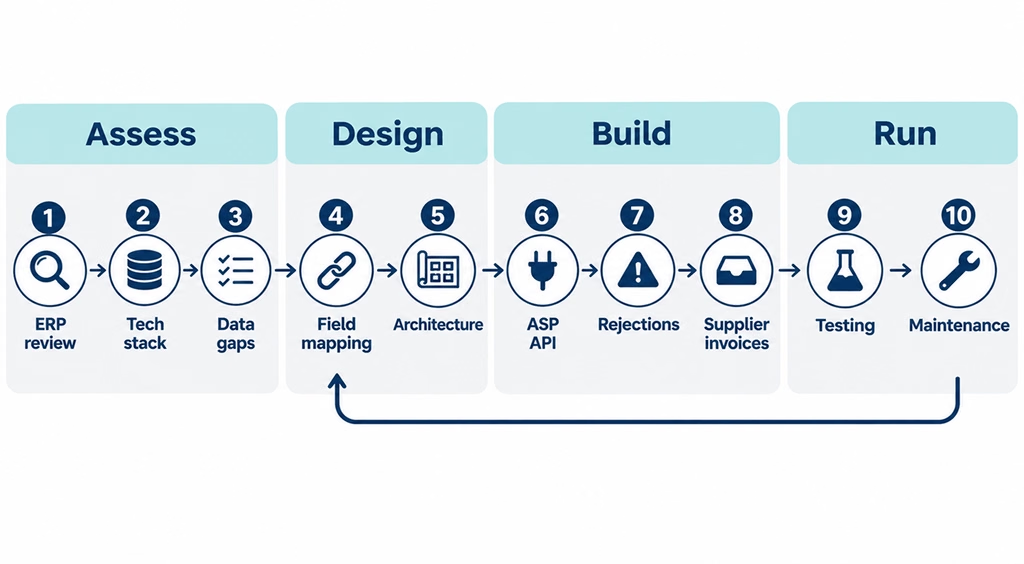
1. Existing ERP assessment.
We start by understanding how your business invoices today: who raises invoices, from which branches, for which kinds of customers, and what happens after. For you, this is a few working sessions with your finance and IT leads. For us, it shows where e-invoicing touches your process.
2. Technology stack and database evaluation.
We review the application’s language and framework, how it is hosted, the database design, existing interfaces and who can safely change the code. This step decides whether we extend the ERP directly, add an API layer, or build a separate integration service.
3. Invoice data gap analysis.
We take real samples: tax invoices, credit notes, export invoices, free-zone sales, foreign-currency invoices, and supplier bills. We check each against the MoF’s mandatory field requirements. You get a clear list of what is missing, what exists but is unstructured, and what is fine.
4. PINT AE field mapping.
We map each required field to where it lives in your ERP, or to the rule that will derive it. Examples are the seller and buyer identifiers, the invoice type code, the transaction type flags and AED amounts on foreign-currency invoices. Where a value doesn’t exist, we agree with your team how it will be captured from now on.
5. Integration architecture selection.
Based on steps 2 to 4, we recommend one approach and explain why. It might be a change inside the ERP, an API layer, or a separate middleware service. We also cover security, error handling and how the design will absorb future rule changes.
6. ASP API integration.
Once you have appointed an accredited ASP, we build the connection to its API or file interface, using its test environment first. Authentication, retries, logging and monitoring are part of this step, not extras.
7. Invoice status and rejection management.
We add status tracking to every invoice in the ERP, a rejection queue with readable reasons, and a controlled way to correct and resend. Your finance team sees problems inside the system they already use.
8. Incoming supplier invoice processing.
We build the inbound flow: receiving supplier e-invoices from the ASP, matching them to suppliers, purchase orders and receipts, and routing exceptions for review.
9. Testing and deployment.
We test every invoice scenario you actually use, end to end with your ASP, ideally through the pilot. Then we deploy with a rollback plan and support your team closely through the first billing cycles.
10. Ongoing technical maintenance.
The rules will keep changing. The guidelines have already moved from v1.0 to v2.0 in eight months. We stay available to update mappings, codes and interfaces when the MoF publishes changes or your ASP updates its API.
Five situations we would assess differently
These are illustrative scenarios, not Sigosoft client case studies. They show how the starting point changes the plan.
A Dubai trading company with a ten-year-old custom ERP
For example, consider a trading company with about AED 30 million in revenue. It runs a web-based ERP built in-house a decade ago that handles quotations, sales orders, stock across two warehouses, invoicing and receivables. It falls in the second phase, so it must appoint an ASP by 31 March 2027 and go live by 1 July 2027.
We would investigate how invoice numbers are generated, whether customer records hold TRNs and structured addresses, and how the ERP treats re-exports and sales to free-zone customers. The likely plan is a customer data cleanup, a middleware service that reads finalised invoices and calls the ASP’s API, and a rejection queue inside the existing invoice screen. Businesses that also run separate distribution management software for van sales or route delivery would need those invoices included in the same flow.
A contracting company with progress billing, retentions and advance invoices
This company’s custom system raises interim payment certificates, holds retention amounts and issues invoices for advance payments. These are exactly the areas the guidelines address in detail.
For advance payments, the guidelines expect a tax invoice when the advance is received, and a final invoice for the remaining balance that refers back to the advance invoice. For retentions, an e-invoice can be issued for the amount after retention, with a separate e-invoice for the retained amount when it becomes payable. The guidelines also say retention calculations belong on a separate commercial document, so the company should settle the approach with its ASP and tax advisor before any code is written. Our work would be mapping each billing event to the right invoice type and making sure each document links correctly to the earlier ones.
A group with a mainland company and a free-zone company
Two legal entities share one ERP instance. Each has its own TRN, its own TIN and its own revenue, so their deadlines may differ. If they are in a VAT group, their intra-group sales have a 24-month grace period on timing, but their sales to outside customers do not.
We would check that the ERP keeps a separate invoice series and tax setup per entity, that the transaction type flags are set correctly for free-zone supplies, and that intra-group transactions are clearly marked. We would also confirm whether both entities will use the same ASP or different ones, because the integration has to route each invoice to the right connection.
A business already running ERPNext
ERPNext, built on the Frappe framework, has a document model, an API and a permissions system to work with. The questions are about configuration and fit. Does your setup hold all the fields PINT AE needs? Are customisations made through proper apps rather than core edits? Is the ASP integration best done as a custom Frappe app?
In most ERPNext cases, we would build a dedicated Frappe app that adds missing fields, sends submitted sales invoices and credit notes to the ASP, stores status responses, and creates purchase invoices from incoming e-invoices for review. Our ERPNext development team works on this kind of extension, keeping it upgrade-safe.
A company on an older desktop ERP with no API
This business runs a Windows desktop ERP installed on a local server, with a SQL database and no integration features. The original vendor no longer supports it, but the staff know it well.
This is where an experienced development team can help. We would map the invoice tables, confirm when a record becomes final, and test whether read-only views can expose clean invoice data safely. The integration service would run on a separate server or in the cloud, poll for new finalised invoices, send them to the ASP, and record statuses in a small companion database. A simple web screen, rather than changes to the desktop app, would show rejections. This buys the business time to plan a proper modernisation without missing the deadline.
Upgrade or replace your ERP for e-invoicing?
You might be wondering whether this is the moment to replace the ERP altogether. Sometimes it is. More often, it is the wrong moment to decide under deadline pressure.
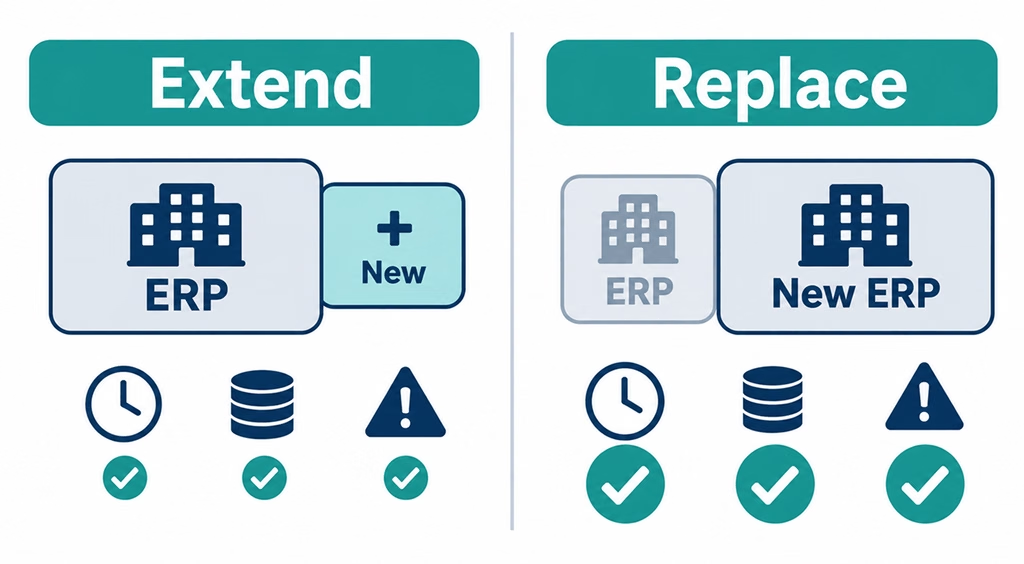
| Extending the existing ERP makes sense when | Replacing the ERP is worth considering when |
|---|---|
| The core data model is sound and only some fields are missing | Invoices, customers and tax data are spread across disconnected tools |
| The technology can expose data through an API, views or exports | The platform is unsupported and nobody can safely change it |
| Your processes are specific and a packaged ERP would force workarounds | The ERP already fails other needs, such as reporting, scale or mobile access |
| You need to meet a 2027 deadline with lower risk | You had already planned a replacement and can include e-invoicing in its scope |
Our view is practical. A full ERP replacement is a large project, and tying your compliance date to it adds a second set of risks. If the system still serves the business, we would extend it. If it is near the end of its life, we would build the e-invoicing integration as a separate service now and reuse it in the replacement later. That way the compliance work is never wasted.
If you are weighing the bigger question, our comparison of traditional ERP and custom AI-powered ERP covers the longer-term trade-offs.
A readiness checklist for your ERP
Use this to see where you stand before speaking to an ASP or a development partner.
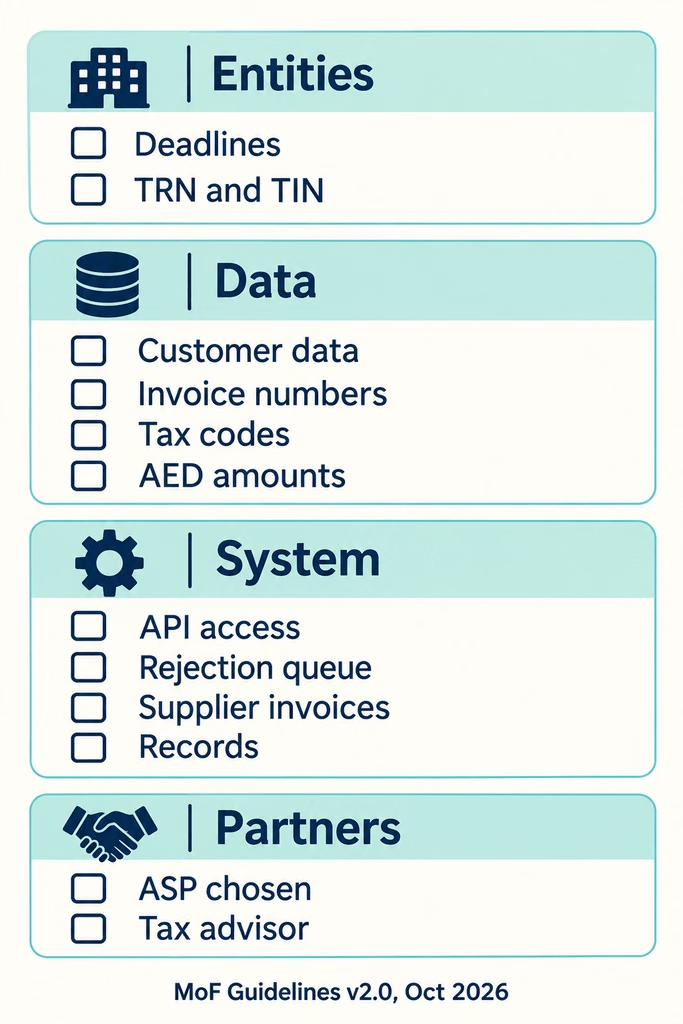
- ☐ Each legal entity’s revenue band and deadline are confirmed
- ☐ Each entity’s TRN and 10-digit TIN are recorded correctly in the ERP
- ☐ Customer records hold TRNs, structured addresses and an onboarding status
- ☐ Invoice numbers are unique and sequential within each legal entity
- ☐ Tax codes can tell standard, zero-rated, exempt, out-of-scope, free-zone and export supplies apart
- ☐ Foreign-currency invoices carry AED amounts
- ☐ Posted invoices cannot be edited; corrections go through credit notes
- ☐ The ERP can expose finalised invoices through an API, views or a reliable export
- ☐ There is a plan for status tracking and a rejection queue
- ☐ Supplier e-invoices have an inbound route into accounts payable
- ☐ Retention, storage and retrieval of e-invoice records are agreed
- ☐ An accredited ASP is shortlisted and its API documentation reviewed
- ☐ Your tax advisor has reviewed your invoice scenarios
If more than a few of these are unchecked, start with the data and the architecture. The ASP connection is rarely the slowest part.
How Sigosoft can help
We design, build and maintain custom ERP systems and the integrations around them. For UAE e-invoicing, that means the full system side of the work: ERP assessment, invoice data gap analysis, PINT AE field mapping, API and middleware development, ASP integration, rejection handling, supplier invoice automation, testing and ongoing maintenance.
Our teams also work on ERPNext and Frappe development, legacy application modernisation and database migration, and wider compliance management tools. If the e-invoicing project shows your ERP needs more than an integration, we can plan that with you as a separate step.
We work alongside your tax advisor and your chosen ASP. They own the regulatory interpretation and the network connection. We make sure your ERP gives them the right data, on time, and that your team can manage it day to day.

Already have a custom ERP running your business? Let’s talk about how your system works today and find the most practical way to prepare it for UAE e-invoicing, before you decide whether anything needs replacing.
Frequently asked questions
Can I use my existing ERP for UAE e-invoicing?
In most cases, yes. The rules require structured invoice data sent through an Accredited Service Provider, not a specific ERP. If your ERP can produce the required fields and exchange data through an API, a database view or a reliable export, it can usually be integrated.
How do I connect my ERP to an ASP in the UAE?
Your ERP, or an integration service beside it, sends finalised invoice data to your ASP, usually through a REST API or file exchange. The ASP converts and validates it, sends it over the Peppol network and reports tax data to the FTA. Your ERP should also receive status updates and incoming supplier invoices back from the ASP.
What if my ERP has no API?
A development team can usually add a small API layer, expose finalised invoices through read-only database views, or use a reliable export, with a middleware service handling the ASP connection. Writing directly into the ERP’s core tables from outside should be avoided.
What is PINT AE?
PINT AE is the UAE’s version of the Peppol International invoice data model, built on UBL 2.1. It defines the fields, codes and rules every UAE e-invoice must follow.
What are the UAE e-invoicing mandatory fields?
The Ministry of Finance publishes them in its Mandatory Field Requirements document. The latest version we reviewed is V1.1, dated 28 October 2026. They include seller and buyer identifiers, invoice type code, transaction type flags, line details, tax amounts and AED values for foreign-currency invoices.
When is the UAE e-invoicing deadline for SMEs?
Businesses with revenue below AED 50 million must appoint an ASP by 31 March 2027 and go live by 1 July 2027. Businesses at AED 50 million or more go live on 1 January 2027.
Are B2C transactions included?
Not at present. Supplies to private individuals who are not in business are outside the system. A future decision could change this, so check with your tax advisor.
What happens if an e-invoice is rejected? Your ASP reports the failure back to you. Your ERP should show the reason, route it to the right person, and let them correct the data and resend it. After an invoice is accepted, corrections go through an e-credit note or an additional invoice.
Do I need to handle supplier e-invoices as well?
Yes. Buyers also onboard with an ASP and receive e-invoices as structured data. Integrating that flow with purchase orders and accounts payable removes manual data entry.
Should I upgrade or replace my ERP for e-invoicing?
If the core system still serves the business, extending it is usually lower risk before a 2027 deadline. If it is near the end of its life, build the e-invoicing integration as a separate service now so it can move to a new ERP later.
Can e-invoice data be stored outside the UAE?
Ministerial Decision No. 197 of 2026 removed the earlier requirement to store e-invoice data in the UAE. The records must still be retained, retrievable and available to the FTA, and that responsibility stays with your business.
Is Sigosoft an Accredited Service Provider?
No. Sigosoft is a software development company. We prepare and integrate your ERP so it works with the accredited ASP you choose, and we work alongside your tax advisor.
Thanks for the feedback!

Jishnu kuttiyadan Sigosoft team
Part of the Sigosoft team building AI automation, custom software and apps for businesses worldwide.
Start the discussion
Questions or experiences to share? Our team reads and replies.