Water Delivery Apps Development
- Enhance Sales Efficiency
- Streamline Order Acceptance and Delivery
- Deliver Consistent and High-Quality Service
- Automated Billing and Invoicing
- Real-Time Inventory Management
- One month Free trial
- Multi languages - English, Arabic, French, Spanish
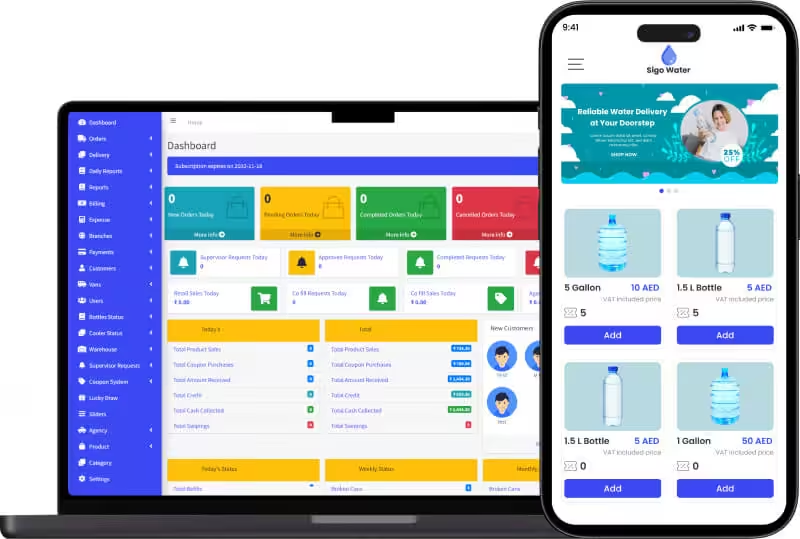
State of the Art Water Delivery App Development Company
Sigosoft offers an advanced water delivery software solution crafted to elevate sales and maximize ROI for water delivery and manufacturing enterprises. With our Water Delivery software, streamline order processing, inventory management, and more while significantly reducing operational costs and time.
We pride ourselves on delivering tailored services to meet your unique needs, empowering your van sales business with our cutting-edge digital delivery system. Trust Sigosoft to unleash the full potential of your business with our advanced water delivery solution.
Features of our Water Delivery App
-

For Customer
-

For Supervisor
-

For Call Center
-

For Sales
-

For Retailer
-

For Warehouse
-

For Admin
-

For Branch

Customer Mobile App
- User-friendly
- Location Tracking
- Multilingual
- Multiple payment methods
 Easy Login And Registration
The customers are able to register and login to the app with ease. The only credentials needed are your name, your phone number, and your photo.
Easy Login And Registration
The customers are able to register and login to the app with ease. The only credentials needed are your name, your phone number, and your photo.
 Multi-Lingual Support
The app supports multiple languages so that people without a grasp over English do not feel left out. This helps in adhering to the needs of the regional population.
Multi-Lingual Support
The app supports multiple languages so that people without a grasp over English do not feel left out. This helps in adhering to the needs of the regional population.
 Browse Products
Customers are able to browse the products available in the app and sort/filter it on the basis of item name, price, or size.
Browse Products
Customers are able to browse the products available in the app and sort/filter it on the basis of item name, price, or size.
 Available Coupons
Customers can view active coupons, coupon packages, used coupons, pending coupons and redeem the coupons as they please. They can even see when each coupon pack expires within the app.
Available Coupons
Customers can view active coupons, coupon packages, used coupons, pending coupons and redeem the coupons as they please. They can even see when each coupon pack expires within the app.
 Edit Profile
Customers can edit their own profile with their name, profile photo, and phone number. They can edit this information any time they please.
Edit Profile
Customers can edit their own profile with their name, profile photo, and phone number. They can edit this information any time they please.
 View And Place Orders
Customers can view and place orders, view order numbers, total price, select location, date, and time and view order statuses like name of the driver and start time.
View And Place Orders
Customers can view and place orders, view order numbers, total price, select location, date, and time and view order statuses like name of the driver and start time.
 Payments
Customers are able to make payments through different methods. There is an online payment gateway, swiping cards, or even cash on delivery is available.
Payments
Customers are able to make payments through different methods. There is an online payment gateway, swiping cards, or even cash on delivery is available.
 Location
The customers are able to mark their location when ordering a product. Furthermore, they can track the location of the delivery partner handling their order.
Location
The customers are able to mark their location when ordering a product. Furthermore, they can track the location of the delivery partner handling their order.
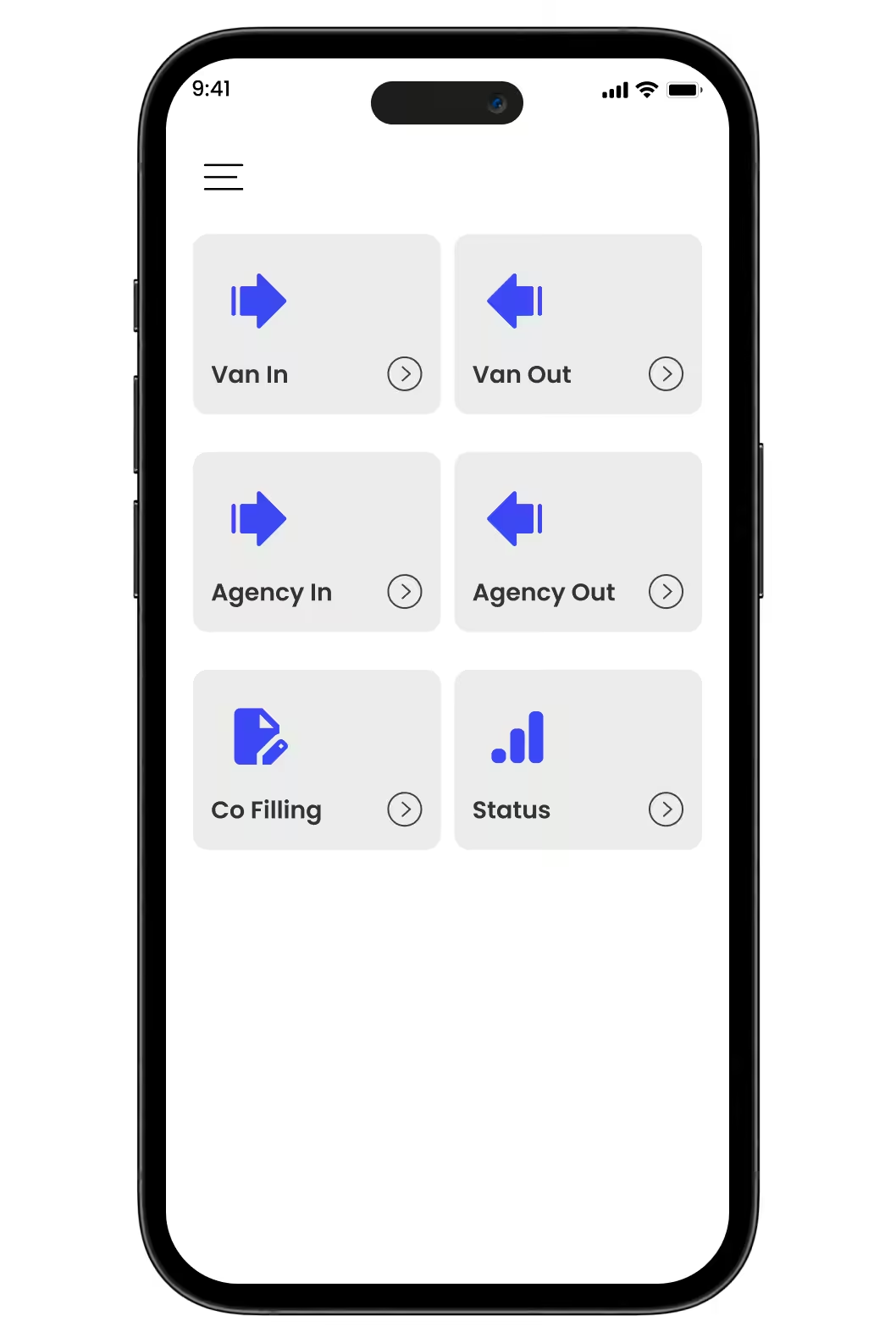
Supervisor Mobile App
- User Friendly
- Vans management
- Stock verification
- Status updates
 Verified Login
Supervisors have a verified login to the app so that unauthorized personnel do not get access to confidential data.
Verified Login
Supervisors have a verified login to the app so that unauthorized personnel do not get access to confidential data.
 Manage Vans Coming In
Supervisors manage the vans coming into a facility by noting the agency names, cans needed, empty cans, full cans, broken cans, smelly/defect cans along with the date and time.
Manage Vans Coming In
Supervisors manage the vans coming into a facility by noting the agency names, cans needed, empty cans, full cans, broken cans, smelly/defect cans along with the date and time.
 Manage Vans Going Out
Supervisors keep track of the agency name, refill cans, new cans if approved, approval date and time and the van out date and time.
Manage Vans Going Out
Supervisors keep track of the agency name, refill cans, new cans if approved, approval date and time and the van out date and time.
 Co-Filling
Supervisors keep a log of the customer name, product, quantity, date and time for new requests, pending requests, and paid requests.
Co-Filling
Supervisors keep a log of the customer name, product, quantity, date and time for new requests, pending requests, and paid requests.
 Receive Status Reports
Supervisors receive daily and monthly status reports about the total new cans, total refills, total broken cans, and total smelly/defect cans.
Receive Status Reports
Supervisors receive daily and monthly status reports about the total new cans, total refills, total broken cans, and total smelly/defect cans.
Call Center Web App
- Multi Informational Dashboard
- New Entries
- Manage Orders
- Manage Customers
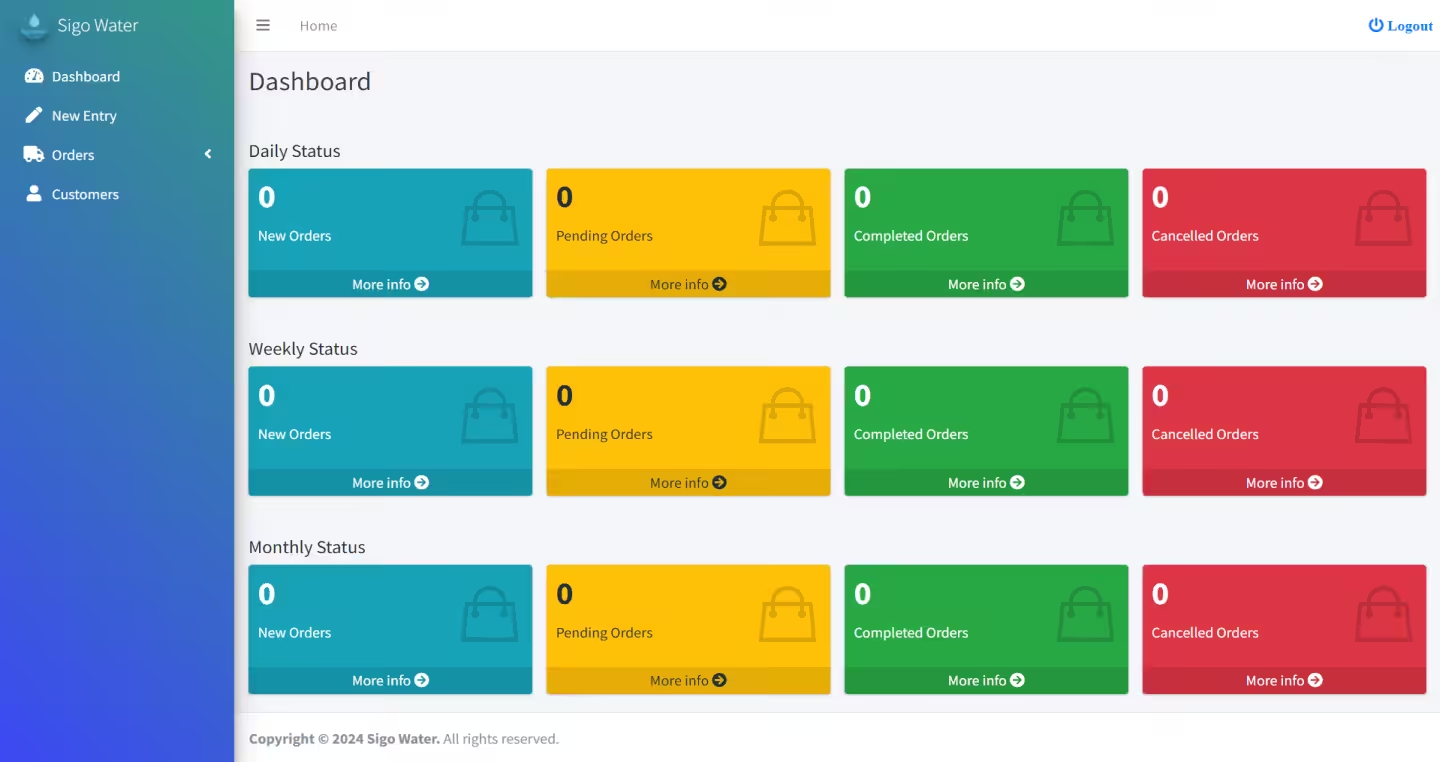
 Live Dashboard
The live dashboard shows daily, weekly, and monthly statuses about new, pending, canceled, and completed orders.
Live Dashboard
The live dashboard shows daily, weekly, and monthly statuses about new, pending, canceled, and completed orders.
 New Entries
Call center employees can easily make detailed new entries complete with a detailed invoice of the order.
New Entries
Call center employees can easily make detailed new entries complete with a detailed invoice of the order.
 Manage Orders
Call center personnel can manage new, pending, canceled, and completed deliveries from the web app itself.
Manage Orders
Call center personnel can manage new, pending, canceled, and completed deliveries from the web app itself.
 Manage Customers
Call center employees can add new customers and manage existing ones complete with a photo and detailed contact information.
Manage Customers
Call center employees can add new customers and manage existing ones complete with a photo and detailed contact information.

For Sales
- User Friendly
- Detailed Profile
- Expense Tracking
- Payments Tracking
Easy Login
The salesman can easily login to the app with his username and password. This feature allows the salesman access to the sales app with ease.
 Add New Sale
The salesman is able to add new sales with the customer name, address, bottles and coolers, amount received, price, and payment method within the app.
Add New Sale
The salesman is able to add new sales with the customer name, address, bottles and coolers, amount received, price, and payment method within the app.
 Add New Expense
Salesmen can add new expenses in the app with details like date, time, expense category, expense amount, and even extra notes.
Add New Expense
Salesmen can add new expenses in the app with details like date, time, expense category, expense amount, and even extra notes.
 Add Customers
Salesmen can add new customers along with the customer name, email, phone number, address, and order details with the app itself.
View Orders
Salesmen can view new , accepted, and completed orders within the app itself from the orders tab in the app. This helps them keep track of each bottle delivered.
Add Customers
Salesmen can add new customers along with the customer name, email, phone number, address, and order details with the app itself.
View Orders
Salesmen can view new , accepted, and completed orders within the app itself from the orders tab in the app. This helps them keep track of each bottle delivered.
 View Payments
Salesmen can view payment histories within the app. Details like total sales, bottle sales, cooler sales, coupon sales, net amount received, cash, swiping, and credit can be viewed on the app.
View Payments
Salesmen can view payment histories within the app. Details like total sales, bottle sales, cooler sales, coupon sales, net amount received, cash, swiping, and credit can be viewed on the app.
 Coupon Sales
Salesmen are able to view all coupon sales and even issue coupons from the app. This feature adds and views all the coupons issued by the app.
Coupon Sales
Salesmen are able to view all coupon sales and even issue coupons from the app. This feature adds and views all the coupons issued by the app.
 Profile
Each salesman has a detailed profile on the app complete with his name, mobile number, van name, van code, vehicle number, and photo.
Profile
Each salesman has a detailed profile on the app complete with his name, mobile number, van name, van code, vehicle number, and photo.
 Summary
There are separate columns for expense and general summary on the app. This helps to keep track of the happenings in the app and the overall sales by any given salesman.
Summary
There are separate columns for expense and general summary on the app. This helps to keep track of the happenings in the app and the overall sales by any given salesman.

Retailer Web App
- Customer Management
- Integrated Billing
- Active Dashboard
- Status Reports
Verified Login
Every retailer has a verified login so that unauthorized personnel do not have access to confidential files. This also ensures that there are no accidental mixups.
Live Dashboard
A dashboard shows live status of the sales and other metrics so that the retailer is able to make changes and do the needful wherever necessary with live updates.
 Sales Reports
Retailers receive daily, weekly, and monthly sales reports so that they can plan and strategize on how to run their business while figuring out the weak points.
Sales Reports
Retailers receive daily, weekly, and monthly sales reports so that they can plan and strategize on how to run their business while figuring out the weak points.
 Billing Setup
The retailer web app comes with a billing setup within the app so that the retail shop can produce a bill to the customers who seek it at the retail store.
Billing Setup
The retailer web app comes with a billing setup within the app so that the retail shop can produce a bill to the customers who seek it at the retail store.
 Manage Customers
Retailers can manage customers through the web app. They can register each new customer into the app with details like his name and phone number, while specifying if he was co filling or or counter sale.
Manage Customers
Retailers can manage customers through the web app. They can register each new customer into the app with details like his name and phone number, while specifying if he was co filling or or counter sale.
Warehouse Web App
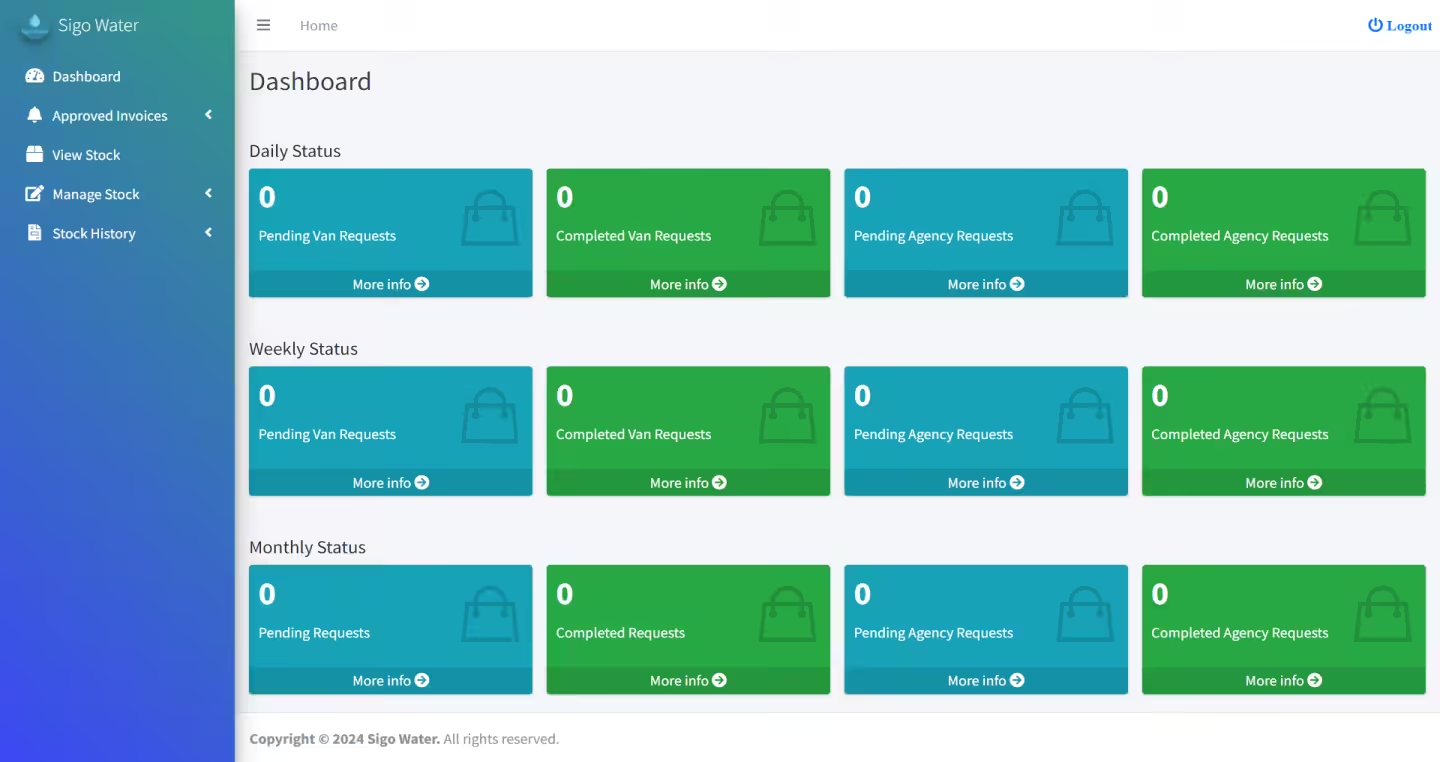
- Approved Invoices
- View Stocks
- Manage Stocks
- Check Stock History
 Approved Invoices
The warehouse web app has a feature which allows it to get approved invoices from the admin while also seeing the invoices which are pending approval from the admin.
Approved Invoices
The warehouse web app has a feature which allows it to get approved invoices from the admin while also seeing the invoices which are pending approval from the admin.
 View Stock
Warehouse personnel are able to view the stocks that are already in the warehouse, the stocks that left the warehouse each day, and the stocks that came in each day.
View Stock
Warehouse personnel are able to view the stocks that are already in the warehouse, the stocks that left the warehouse each day, and the stocks that came in each day.
 Manage Stock
Warehouse personnel can add or remove stock by noting down the date, name of the person, number of items, and other important notes.
Manage Stock
Warehouse personnel can add or remove stock by noting down the date, name of the person, number of items, and other important notes.
 Stock History
Warehouse personnel are able to order the billing history and sort it by agency, supervisor, or date. Furthermore, they can update new stock histories and stock removals within the app.
Stock History
Warehouse personnel are able to order the billing history and sort it by agency, supervisor, or date. Furthermore, they can update new stock histories and stock removals within the app.

Admin Web App
- Multi Informational Dashboard
- Complete Business Management
- Sales Tracking
- Payments and Expense Tracking
 Dashboard
The dashboard lets the admin see all the happenings in the app on a single screen. All the new, pending, completed, and canceled orders can be viewed along with requests, sales, customers, and status.
Dashboard
The dashboard lets the admin see all the happenings in the app on a single screen. All the new, pending, completed, and canceled orders can be viewed along with requests, sales, customers, and status.
 Add Categories
The admin is able to add, manage, and edit categories like cans, accessories, and water according to his choice from the admin app itself.
Add Categories
The admin is able to add, manage, and edit categories like cans, accessories, and water according to his choice from the admin app itself.
 Manage Orders
The admin can manage all orders and deliveries with this feature. He can see new, pending, completed, and canceled orders along with retail and co-filling sales.
Manage Orders
The admin can manage all orders and deliveries with this feature. He can see new, pending, completed, and canceled orders along with retail and co-filling sales.
 Manage Product
The admin can easily add and manage the products delivered by the company with just the click of a button. This feature allows easy customisation.
Manage Billing
The admin is able to manage all billing related matters within the app itself. Anything like van billing, agency billing, co filling requests, co fill history, new retail filling, and general billing history could be taken care of from the app.
Manage Product
The admin can easily add and manage the products delivered by the company with just the click of a button. This feature allows easy customisation.
Manage Billing
The admin is able to manage all billing related matters within the app itself. Anything like van billing, agency billing, co filling requests, co fill history, new retail filling, and general billing history could be taken care of from the app.
 Manage Vans
Admins can manage vans under the company and know the van status while viewing the pending credits through the app itself. The feature shows daily, weekly, monthly, and lifetime status of vans. They can even take care of pending credits.
Manage Vans
Admins can manage vans under the company and know the van status while viewing the pending credits through the app itself. The feature shows daily, weekly, monthly, and lifetime status of vans. They can even take care of pending credits.
 Manage Agency
The admins are able to see the agency status and manage the agencies under the company with the app itself. The daily, weekly, monthly, and lifetime status can be viewed and taken care of within the app itself.
Manage Agency
The admins are able to see the agency status and manage the agencies under the company with the app itself. The daily, weekly, monthly, and lifetime status can be viewed and taken care of within the app itself.
 Manage Staff
Manage all the staff in the company like the warehouse managers, supervisors, retail managers, and call center staff within the app itself. The admin is able to handle everything with ease.
Manage Staff
Manage all the staff in the company like the warehouse managers, supervisors, retail managers, and call center staff within the app itself. The admin is able to handle everything with ease.
 Manage Customers
Manage or add customers with the app itself. The admin can manage and add all kinds of customers with ease from.within the app.
Manage Customers
Manage or add customers with the app itself. The admin can manage and add all kinds of customers with ease from.within the app.
 Manage Supervisor Requests
The admins are able to manage all supervisor requests within the company with the help of the admin app. Be it van or agency, it could be handled from the app.
Warehouse Management
The admin is able to manage the warehouse from the app itself. He can view the approved invoices, stock, and stock history within the app. He can even manage the stock from the app.
Manage Supervisor Requests
The admins are able to manage all supervisor requests within the company with the help of the admin app. Be it van or agency, it could be handled from the app.
Warehouse Management
The admin is able to manage the warehouse from the app itself. He can view the approved invoices, stock, and stock history within the app. He can even manage the stock from the app.
 Manage Reports
The admins can manage all kinds of reports like sales, van, retail, co-fill, agency, VAT, and production reports from.the app itself.
Manage Reports
The admins can manage all kinds of reports like sales, van, retail, co-fill, agency, VAT, and production reports from.the app itself.
 Manage Delivery Schedule
The admin can view and manage the delivery schedule of the salesmen from the app. This feature allows the admin to keep track of the salesmen at all times.
Manage Delivery Schedule
The admin can view and manage the delivery schedule of the salesmen from the app. This feature allows the admin to keep track of the salesmen at all times.
 Manage Bottles
The admins can view and edit the status of any bottle in any van at any given time. This feature helps to keep track of all the bottles deployed for delivery.
Manage Bottles
The admins can view and edit the status of any bottle in any van at any given time. This feature helps to keep track of all the bottles deployed for delivery.
 Manage Coolers
The admins can view and manage the coolers from the app itself. This helps to keep track of the coolers and let the admins know when each cooler is deployed and returned.
Manage Coupons
Admins can manage coupon packages and coupon purchases within the app itself. This way, they can keep track of issued and used coupons.
Manage Payments
The admins are able to manage all payments whether it is customer, agency, or van from the app itself. They can even view the payment history from anyone at any given time.
Manage Coolers
The admins can view and manage the coolers from the app itself. This helps to keep track of the coolers and let the admins know when each cooler is deployed and returned.
Manage Coupons
Admins can manage coupon packages and coupon purchases within the app itself. This way, they can keep track of issued and used coupons.
Manage Payments
The admins are able to manage all payments whether it is customer, agency, or van from the app itself. They can even view the payment history from anyone at any given time.
 Manage Expenses
Admins can manage all expenses within the app itself. This feature allows to categorize the expenses, calculate the expenses, see pending payments and even view the payment histories.
Manage Expenses
Admins can manage all expenses within the app itself. This feature allows to categorize the expenses, calculate the expenses, see pending payments and even view the payment histories.

Branch Web App
- Get branch wise sales reports
- Manage the customers branch wise
- Track delivery of branches separately
- Easy management of business in separate regions
 Dashboard
One of the standout features of the branch admin app is its ability to generate detailed branch-wise sales reports. This functionality offers several critical advantages for branch managers and decision-makers.
Manage Customer
By organizing customer data branch-wise, managers can personalize interactions based on the specific preferences and behaviors of customers in each location. This tailored approach helps build stronger relationships and enhances customer satisfaction.
Dashboard
One of the standout features of the branch admin app is its ability to generate detailed branch-wise sales reports. This functionality offers several critical advantages for branch managers and decision-makers.
Manage Customer
By organizing customer data branch-wise, managers can personalize interactions based on the specific preferences and behaviors of customers in each location. This tailored approach helps build stronger relationships and enhances customer satisfaction.
 Manage Delivery
Branch managers can monitor the status of deliveries in real-time for each location. This visibility ensures that they can provide accurate updates to customers, enhancing transparency and trust.
Manage Delivery
Branch managers can monitor the status of deliveries in real-time for each location. This visibility ensures that they can provide accurate updates to customers, enhancing transparency and trust.
 Managing Regions
By managing regions separately, businesses can allocate resources—such as staff, inventory, and budget—more effectively. This ensures that each region has what it needs to succeed without overspending or underutilizing resources.
Managing Regions
By managing regions separately, businesses can allocate resources—such as staff, inventory, and budget—more effectively. This ensures that each region has what it needs to succeed without overspending or underutilizing resources.
Demo
Customer
Mobile:904889724
Otp:Otp will be displayed in your phone.

Delivery
Username:S5
Password:123456
Supervisor
Username:956733272
Password:123456
FAQ
Ans.
Sigosoft’s Water Delivery App is a complete digital solution for bottled water suppliers, distributors, and manufacturing plants. It automates order management, delivery scheduling, subscription tracking, invoicing, and real-time route monitoring – reducing manual errors and improving ROI.
Ans.
Yes. The platform supports multilingual interfaces including Arabic, Spanish, and Turkish, and automatically adapts measurement units – gallons, litres, or any custom size – based on regional preferences.
Ans.
Customers can easily place one-time or recurring orders using the Sigo Water Customer App. They receive instant notifications, live driver tracking, delivery confirmations, and digital receipts for a transparent, real-time experience.
Ans.
Absolutely. The solution scales from single-branch operations to enterprise-level distributors with multiple plants or franchises. Each branch can have its own pricing, tax rules, and delivery areas while sharing centralized analytics.
Ans.
The system automatically records issued and returned jars, applies refundable deposits, and maintains detailed jar-return reports – helping prevent loss or mismatch of inventory.
Ans.
Yes. The platform supports API-based integration with websites, ERP systems, and regional payment gateways (cards, wallet, COD). It also allows export to Excel or accounting tools for reconciliation.
Ans.
Yes. The driver app features smart route optimization, real-time navigation, delivery proofs, and cash collection tracking. Admins can view delivery progress, performance reports, and GPS history from the web dashboard.
Ans.
Businesses using Sigosoft Water Delivery typically see improved delivery accuracy, faster billing, reduced fuel costs, and increased customer retention through automated subscriptions and loyalty programs.
Ans.
Yes. The software is fully configurable for GCC,Middle East and international markets, supports right-to-left Arabic layouts, VAT and other tax structures, and integrates with region-specific payment providers.
Ans.
Deployment can be completed in as little as 2–3 weeks. Sigosoft’s onboarding includes setup, product import, driver app training, and full technical support to ensure smooth adaptation.