Van Sales App Development
- Keep your business moving with our van sales app
- An app designed to improve field sales and delivery processes
- Easily accept and deliver your orders
- Offer a reliable and quality service to your customers

Top-notch Van Sales App Development Company
Sigosoft, one of the leading mobile app development companies, offers the amazing van sales app. With this app, you can boost your sales and increase your ROI.Van Sales can prove to be an asset for your company, as well as the sales team. With Sigosoft, increase your digital offering using a van sales app. Our Van sales app can help you in reducing the cost and time required for order processing.
At Sigosoft, we strive hard to offer service as per your requirements. With our digital delivery system, you can enhance your van sales business to a great extent.Use Sigosoft’s Van Sales App and enhance your sales!
Features of our Vansales App


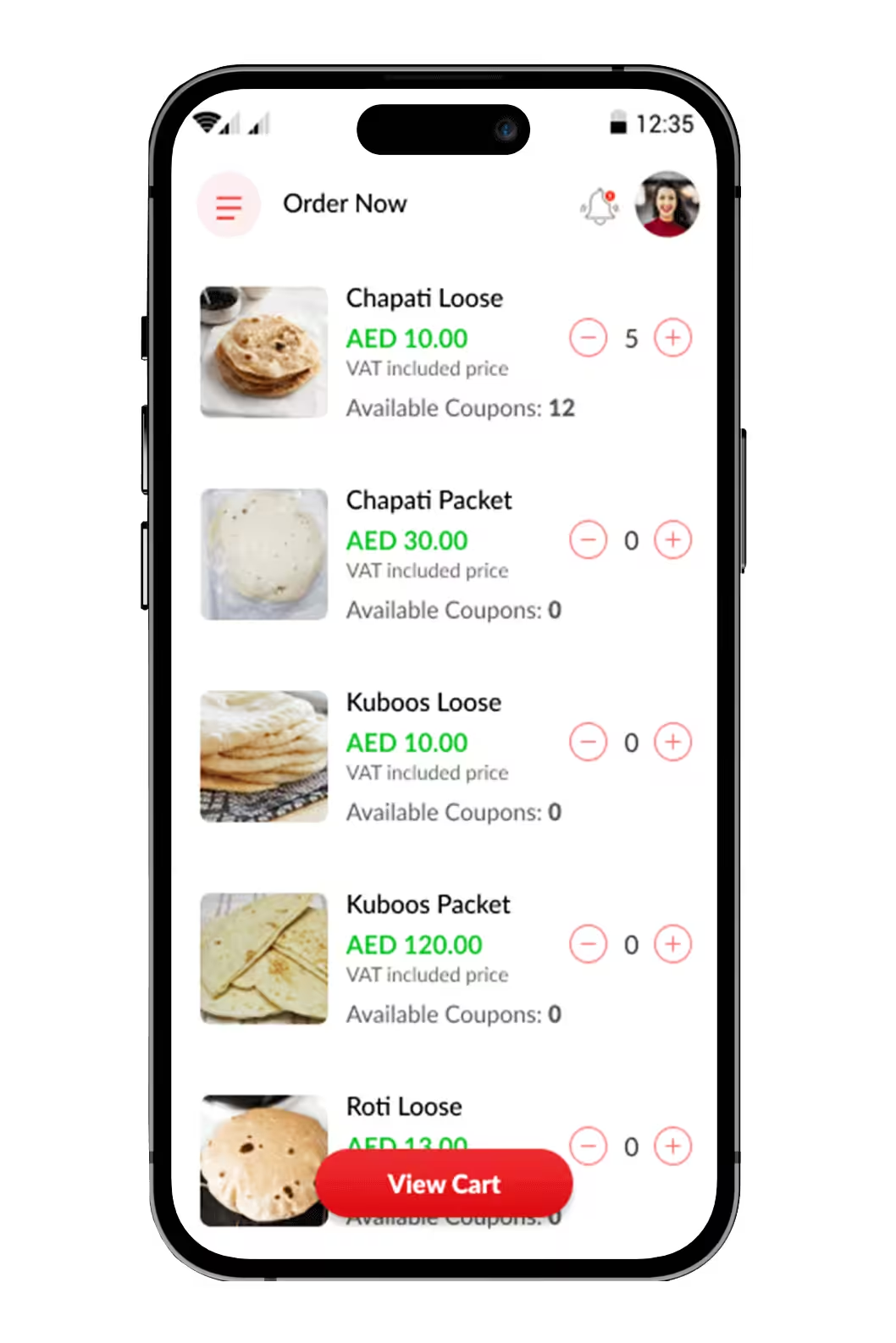
Customer Mobile App
- Easy registration
- Book products with fewer steps
- Hassle-free payment
- Coupon codes for special discounts
 Registration and Login
The sign-in page is the initial process to get into the application, and we can make the processes of registration and authorization simple using Google, Facebook logins.
Registration and Login
The sign-in page is the initial process to get into the application, and we can make the processes of registration and authorization simple using Google, Facebook logins.
 Complete Profile
The customers can add the details such as gender, contact number, address, and so on to their profile.
Complete Profile
The customers can add the details such as gender, contact number, address, and so on to their profile.
 Product Details
The customers can view the product details.
Product Details
The customers can view the product details.
 Coupon Codes
The users can use the coupon codes and special discounts which they will be notified of for any occasion.
Coupon Codes
The users can use the coupon codes and special discounts which they will be notified of for any occasion.
 Multiple Payment Methods
The user can pay with credit or debit cards, internet banking, and even cash on delivery (COD) is available.
Multiple Payment Methods
The user can pay with credit or debit cards, internet banking, and even cash on delivery (COD) is available.
 Fast Delivery
The users can get the ordered products delivered at the scheduled timing.
Fast Delivery
The users can get the ordered products delivered at the scheduled timing.
 Real Time Integration
Real-time integration ensures that the van sales representatives always have access to up-to-date customer accounts and product information, order history, invoices, and statements.
Real Time Integration
Real-time integration ensures that the van sales representatives always have access to up-to-date customer accounts and product information, order history, invoices, and statements.
 Proof of Delivery
When placing an order, you can quickly and conveniently send the customers a proof of delivery.
Proof of Delivery
When placing an order, you can quickly and conveniently send the customers a proof of delivery.
 Address Adding Based on Location
The customers can add the address based on their location by allowing the app to access their location.
Address Adding Based on Location
The customers can add the address based on their location by allowing the app to access their location.
 Multiple Language Support
The app supports multiple languages from which the users can choose their convenient ones.
Multiple Language Support
The app supports multiple languages from which the users can choose their convenient ones.
 Push Notifications
Whenever there is any change in orders or any important information, the users will be notified.
Push Notifications
Whenever there is any change in orders or any important information, the users will be notified.
 Order History
The customers can view the order history and details of the drivers.
Order History
The customers can view the order history and details of the drivers.
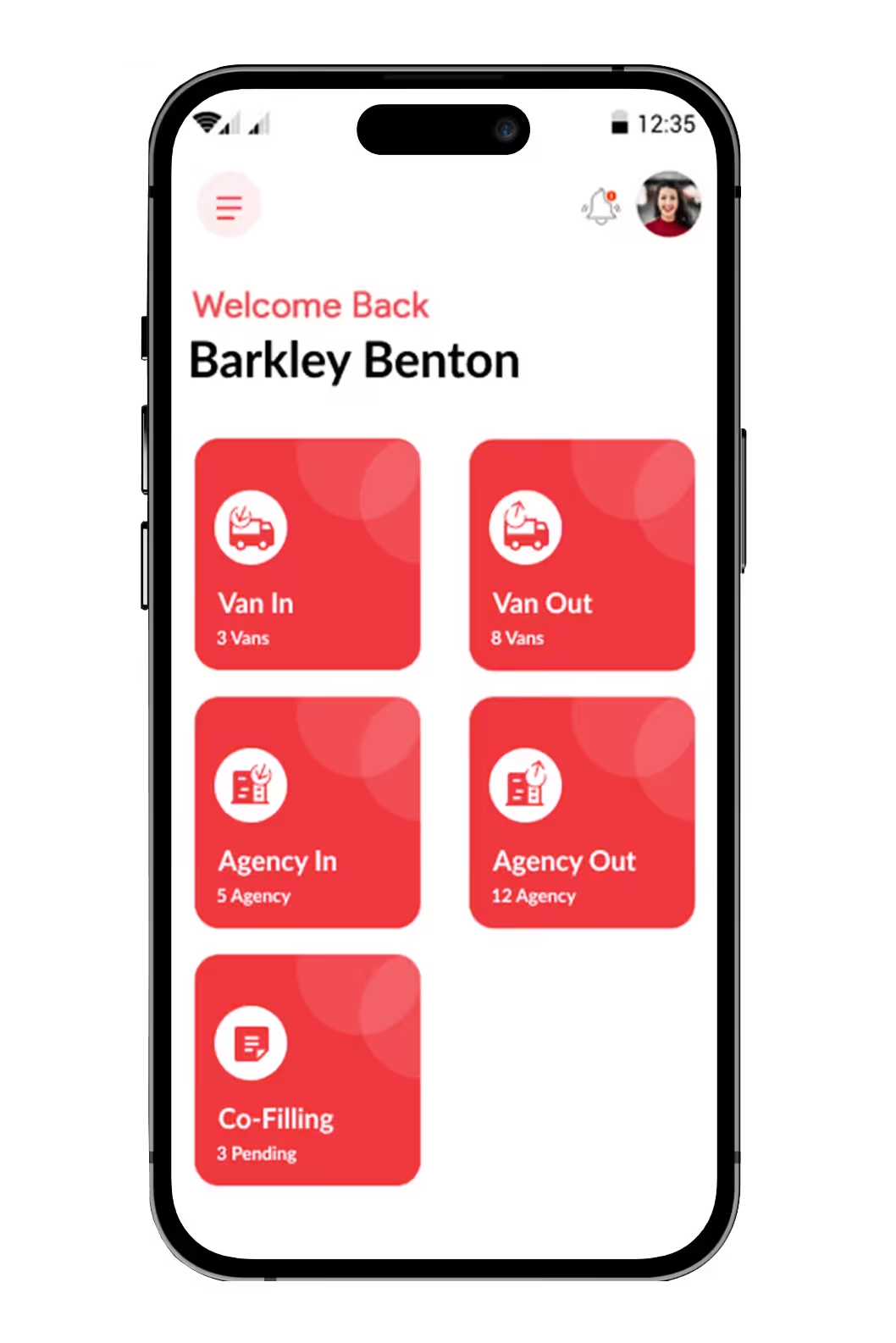
Supervisor Mobile App
- An app that lets supervisors manage their accounts
- Easy signup
- Van in & Van out information
- Agency in & Agency out information
Easy Sign Up
The supervisor can easily sign-up using the username and password.
 View and Edit Profile
The supervisor can view and edit their profile and also change the password.
View and Edit Profile
The supervisor can view and edit their profile and also change the password.
 Van In
This feature enables the supervisors to enter the requests from the van drivers. The supervisors have access to information about the number of refills, new, broken and defective products in the van.
Van In
This feature enables the supervisors to enter the requests from the van drivers. The supervisors have access to information about the number of refills, new, broken and defective products in the van.
 Van Out
This feature displays the completed order requests received from the drivers. When a van driver initiates a request, admin can accept the same and it will be redirected to the warehouse. After the completion of this process, these completed requests are moved to Van out.
Van Out
This feature displays the completed order requests received from the drivers. When a van driver initiates a request, admin can accept the same and it will be redirected to the warehouse. After the completion of this process, these completed requests are moved to Van out.
 Agency In
This feature enables the supervisors to view the load in requests initiated by the agencies and it has similar functionalities as that of Van In.
Agency In
This feature enables the supervisors to view the load in requests initiated by the agencies and it has similar functionalities as that of Van In.
 Agency Out
This feature resembles the same functionality of Van out. The agency request will be approved by the admin and moved to the warehouse. After marking it as completed, the request will be moved to the agency out.
Agency Out
This feature resembles the same functionality of Van out. The agency request will be approved by the admin and moved to the warehouse. After marking it as completed, the request will be moved to the agency out.
 Co-Filling
Co-filling has 2 categories - 'Pending' and 'Completed'. When a customer initiates a new request for bulk orders, it will be added to the pending list until it is billed by either the retailer or admin. After billing the request, it will be moved to the completed list.
Co-Filling
Co-filling has 2 categories - 'Pending' and 'Completed'. When a customer initiates a new request for bulk orders, it will be added to the pending list until it is billed by either the retailer or admin. After billing the request, it will be moved to the completed list.
 Status
The supervisor can view the status of the received requests. It can be viewed either on a daily basis or a monthly basis.
Status
The supervisor can view the status of the received requests. It can be viewed either on a daily basis or a monthly basis.
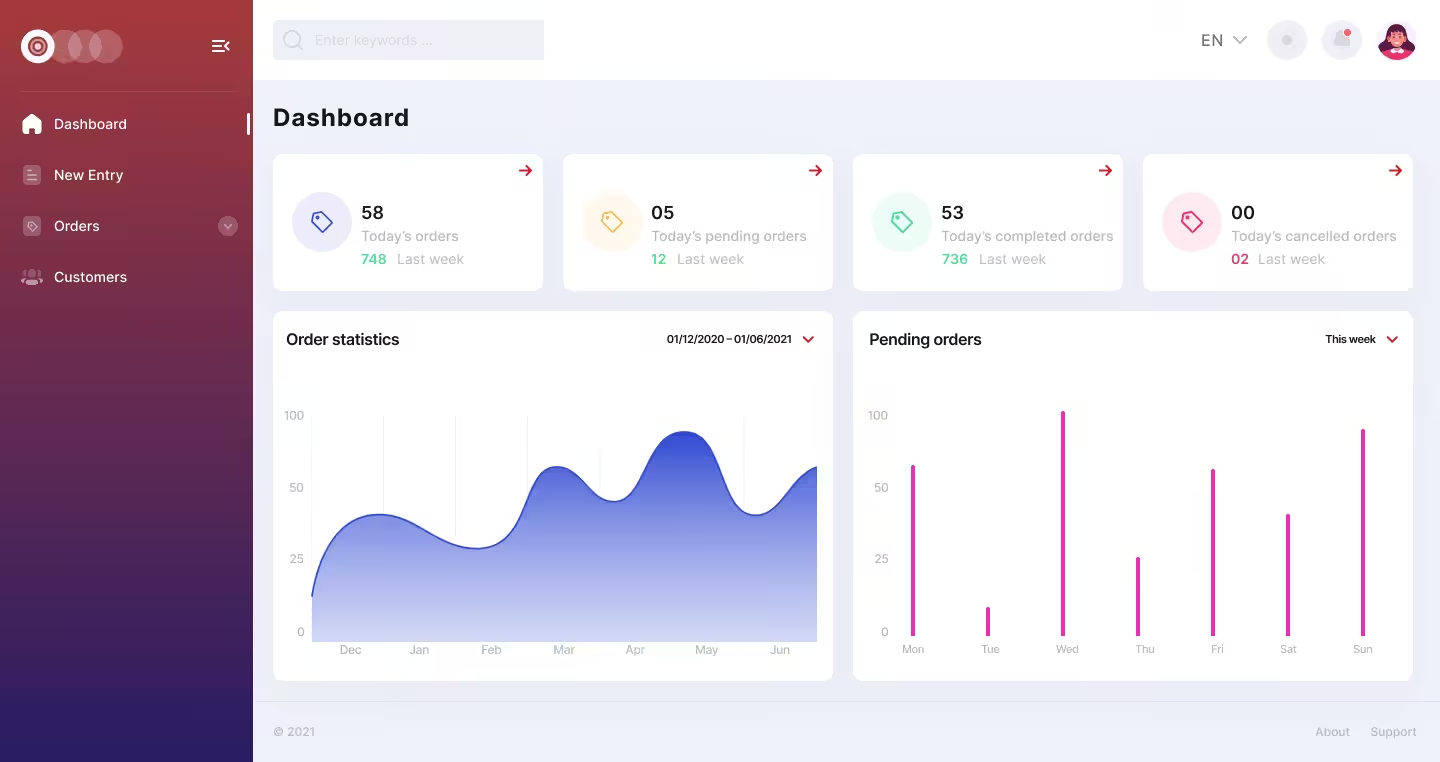
Call Center Web App
- Easy guide to the customers at anytime
- Customer management
- Order management
- Easy registration of new entries
 Customer Management
This feature enables the customer service person to add, view and edit new customers.
Customer Management
This feature enables the customer service person to add, view and edit new customers.
 New Entry
The new entries will be registered in the call center app.
New Entry
The new entries will be registered in the call center app.
 Manage Orders
The call center person can view and manage the order details.
Manage Orders
The call center person can view and manage the order details.
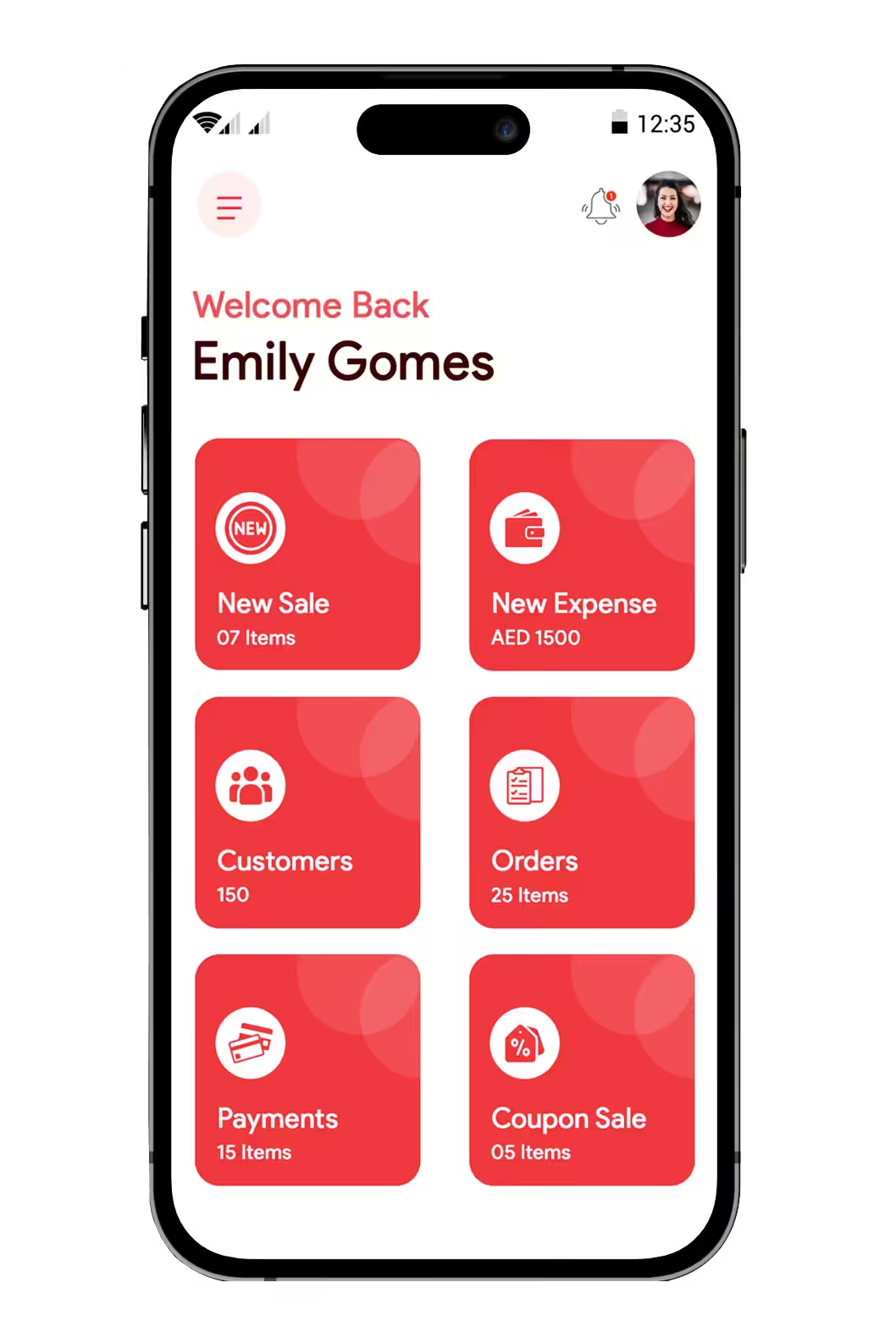
Driver App
- Handle customer requests on a single screen
- Drivers can add new customers
- Payment management
- Order management
 New Sale
The drivers can give services to the unregistered customers.
New Sale
The drivers can give services to the unregistered customers.
 Profile View
The driver details such as van code, van name, vehicle number, name and contact number of driver, etc can be viewed.
Coupon Sale
The drivers can use the coupon sale with the regular and recently added customers.
Profile View
The driver details such as van code, van name, vehicle number, name and contact number of driver, etc can be viewed.
Coupon Sale
The drivers can use the coupon sale with the regular and recently added customers.
 New Customer Adding
The drivers can add the new customers to the list.
New Customer Adding
The drivers can add the new customers to the list.
 Payment History
The drivers can maintain the history of the payments done.
Expense Adding
The drivers can assign the additional expenses to the supervisor.
Reports
The drivers can maintain a report on a daily and monthly basis.
Order Management
The drivers can accept, reject and complete the orders.
Push Notifications
The drivers will get notified with a pop-up message if there are any changes happening in the order.
Payment History
The drivers can maintain the history of the payments done.
Expense Adding
The drivers can assign the additional expenses to the supervisor.
Reports
The drivers can maintain a report on a daily and monthly basis.
Order Management
The drivers can accept, reject and complete the orders.
Push Notifications
The drivers will get notified with a pop-up message if there are any changes happening in the order.
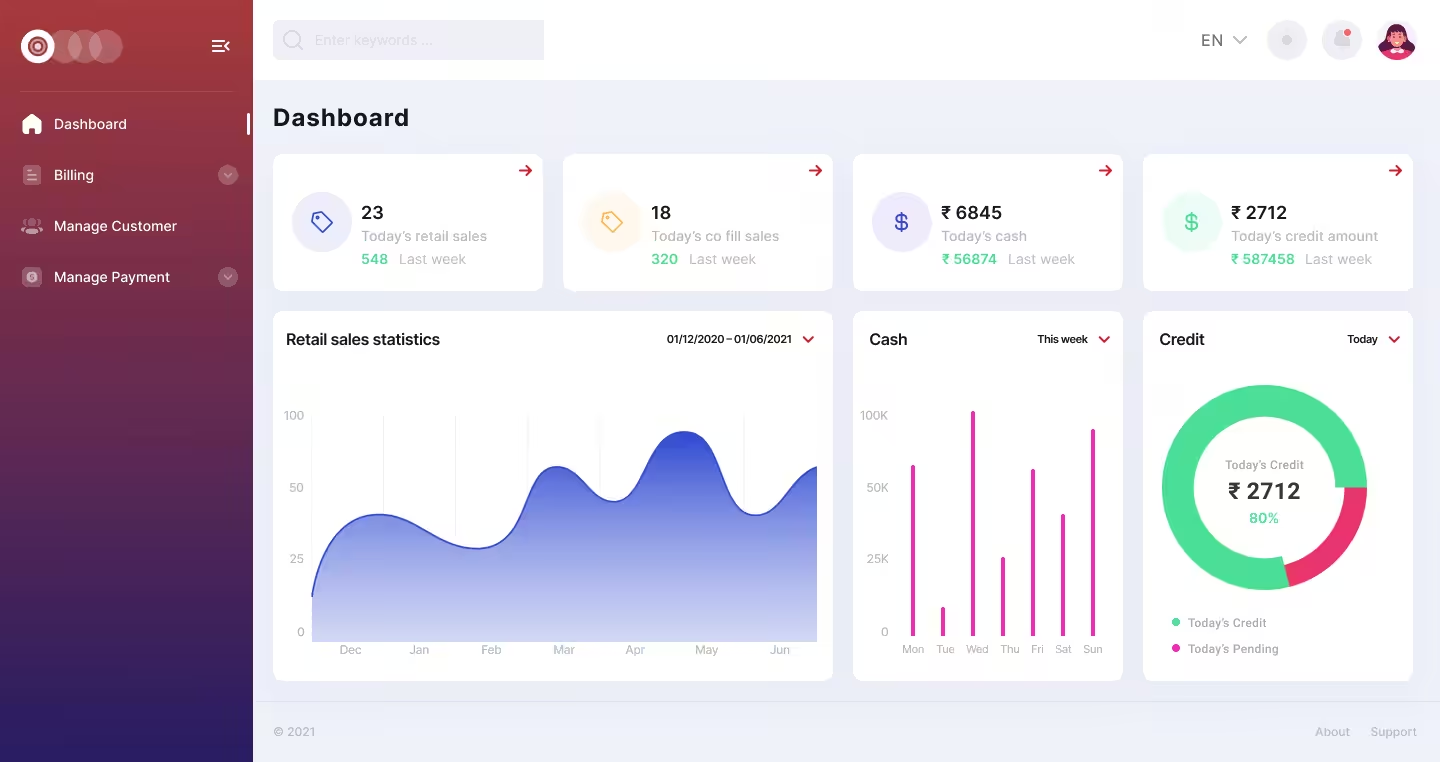
Retailer Web App
- A complete sales support for the customers
- Easy billing
- Retailers can view the payment history
- Helps to keep track of the sales processes
 Customer Management
This helps to add customer data such as Name, address, e-mail, date of purchase, previous order, etc.
Customer Management
This helps to add customer data such as Name, address, e-mail, date of purchase, previous order, etc.
 Billing
The customers can pay the retailer directly through the app and the billing feature helps to keep track of monthly payments and daily payments when sales are done through the app, as well as to produce invoices.
Billing
The customers can pay the retailer directly through the app and the billing feature helps to keep track of monthly payments and daily payments when sales are done through the app, as well as to produce invoices.
 Print
This helps to have a record of sales done and it can be stored for the future purpose.
Payment History
This feature enables the retailer to view the payment history, pending payments and can complete the pending payments.
Report
A report contains log activity, sales traces, and other information to help the retail owners keep track of the process they follow to increase sales.
Print
This helps to have a record of sales done and it can be stored for the future purpose.
Payment History
This feature enables the retailer to view the payment history, pending payments and can complete the pending payments.
Report
A report contains log activity, sales traces, and other information to help the retail owners keep track of the process they follow to increase sales.
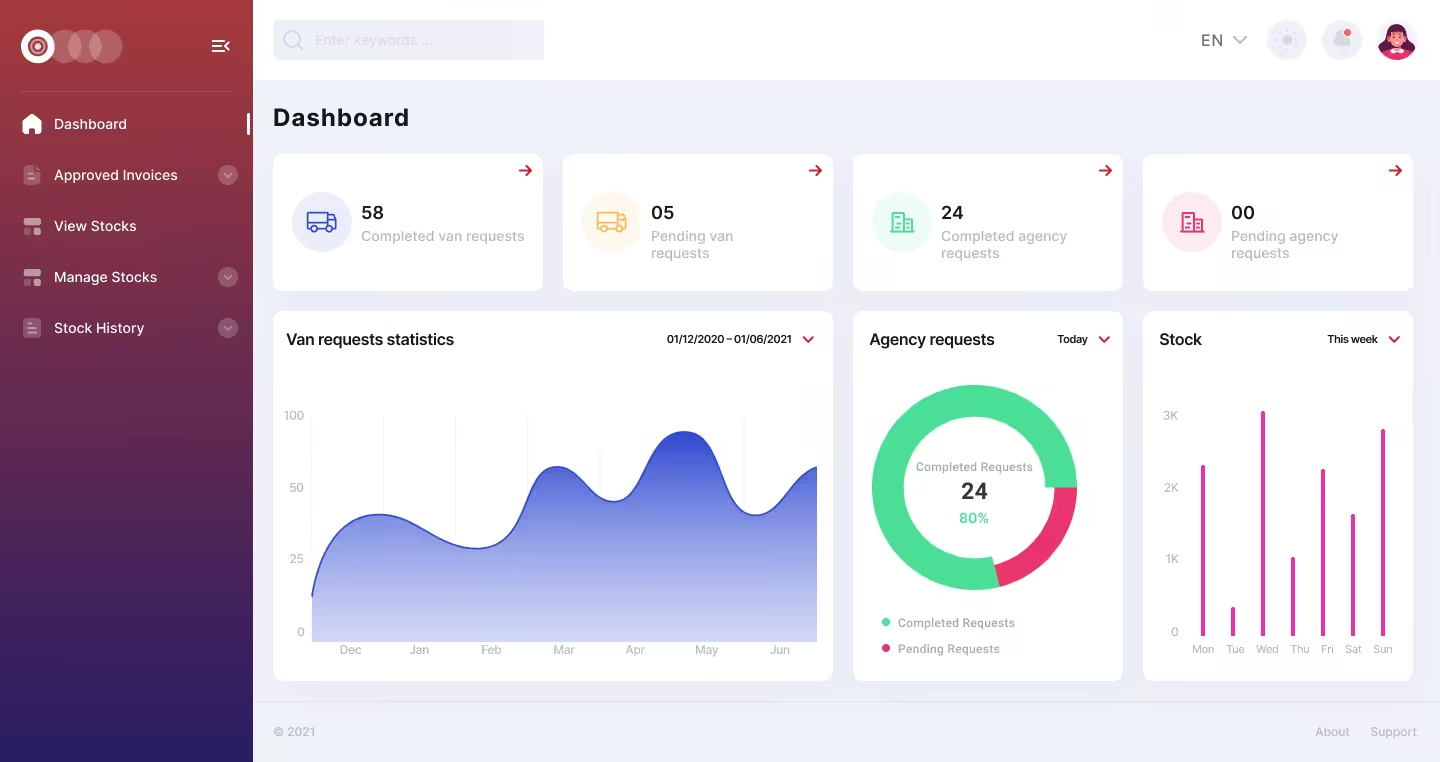
Warehouse Web App
- Enables control over the movement & storage of goods within the warehouse
- Stock management
- Collect feedback from supervisors
- Reports on stock information
Manage Request
This helps to collect and track the feedback given by the supervisors.
 Manage Stock
This helps in keeping track of the number of stocks left out and the stocks being sold out.
Manage Stock
This helps in keeping track of the number of stocks left out and the stocks being sold out.
 Stock History
This feature helps to store the stock details in the database for future use.
Reports
A report contains stock information that can help to make changes in the next stock activity if needed.
Stock History
This feature helps to store the stock details in the database for future use.
Reports
A report contains stock information that can help to make changes in the next stock activity if needed.

Admin Web App
- A live dashboard to access the complete functions of the app
- Location tracking
- Complete management of the application
- Receive feedback from the app users
 Dashboard
The admin can easily access the functioning of the entire app through the dashboard.
Dashboard
The admin can easily access the functioning of the entire app through the dashboard.
 Location
The admin can track the location of the drivers.
Order Management
The admin can accept, reject and complete the orders placed by the customers.
Location
The admin can track the location of the drivers.
Order Management
The admin can accept, reject and complete the orders placed by the customers.
 Staff Management
The admin can manage the tasks assigned to the drivers.
Staff Management
The admin can manage the tasks assigned to the drivers.
 Feedback Management
The admin can send a request to the app users asking them to leave feedback and reviews about their recent purchase in the app.
Feedback Management
The admin can send a request to the app users asking them to leave feedback and reviews about their recent purchase in the app.
 Van Stock Management
The admin can manage the inventory of the products.
Expense Management
The admin can manage the expenses of the drivers.
Reports
The admin can view the reports of the drivers.
Van Stock Management
The admin can manage the inventory of the products.
Expense Management
The admin can manage the expenses of the drivers.
Reports
The admin can view the reports of the drivers.
 Category Management
The admin can manage the categories, sub-categories or product attributes flawlessly to sell multiple products of any range or quantity.
Category Management
The admin can manage the categories, sub-categories or product attributes flawlessly to sell multiple products of any range or quantity.
 Billing
The admin can handle the billing.
Billing
The admin can handle the billing.
 Vans Management
The admin can assign the vans to the drivers.
Customers Management
Admin panel has a built-in Customer Relationship Management (CRM) which helps your customers to log in, edit their address and view their order history.
Vans Management
The admin can assign the vans to the drivers.
Customers Management
Admin panel has a built-in Customer Relationship Management (CRM) which helps your customers to log in, edit their address and view their order history.
 Supervisor Requests
The admin can work on the requests sent by the supervisor.
Supervisor Requests
The admin can work on the requests sent by the supervisor.
 Payments Management
The admin can manage the transactions through online payments.
Payments Management
The admin can manage the transactions through online payments.
 Warehouse Management
The admin can control the movement and storage of products within a warehouse and process transactions such as shipping, receiving, stocking, and picking.
Warehouse Management
The admin can control the movement and storage of products within a warehouse and process transactions such as shipping, receiving, stocking, and picking.
Demo
Customer
Mobile:904889724
Password:12345678

Driver
Username:s1
Password:12345678
Supervisor
Mobile:974580721
Password:12345678
FAQ
Ans.
A van sales app empowers your mobile sales team (in vans/trucks) with in-field order entry, stock checks, payment collection and route tracking. Sigosoft develops such systems to streamline distributor & field-sales workflows, reducing order delays and improving visibility.
Ans.
Key features include:
- Beat & route planning for van-sales visits
- Real-time stock syncing and van-warehouse transfer management
- On-the-spot invoicing and payment capture
- Driver/agent GPS tracking and visit verification
Analytics dashboard for sales, collections and route performance
Sigosoft’s platform covers all of these plus optional modules like credit-limit checks, offline mode, multiple customer price-lists.
Ans.
Development cost and time depend on your business scope (single region vs multi-region), custom modules (inventory-transfer, offline sync, advanced analytics), and platforms (Android, iOS, Web). A baseline version may be built within a moderate budget, while a fully-featured, multi-location distribution system may take longer. Sigosoft provides transparent quotes after scoping.
Ans.
Yes. Sigosoft offers white-label van sales solutions that can be branded with your logo, domain, colour scheme and business logic. You can adapt to your model whether direct-store-delivery (DSD), dealer-sales, van-sales beat model, or multi-branch distribution.
Ans.
Absolutely. For distributors operating across India, GCC, Africa or other regions, Sigosoft’s platform supports localisation in languages, regional units of measure, currencies, tax regimes, and delivery/beat scheduling suited to local markets.
Ans.
The van-sales system supports region-specific payment gateways (for example UPI, Razorpay in India; PayTabs, CCAvenue in GCC) and can integrate with your logistic/field-fleet systems (van tracking, load/unload workflows, inventory transfer between warehouse and van).
Ans.
Benefits and revenue gains come from:
- Faster order booking and shorter turnaround
- Higher field-coverage (more visits per van) through route-optimization
- Lower stock errors and pilferage via van-ware house sync
Better collection tracking and cash-flow control
Sigosoft’s solution is built to deliver measurable distribution-efficiency improvements.
Ans.
Sigosoft uses modern stacks (for example cross-platform frameworks like Flutter, backend frameworks like Laravel / Node.js) to deliver mobile + web apps that are extensible, maintainable and high-performing. This ensures you can ramp up your field-sales operations without technological bottlenecks.
Ans.
The solution supports offline mode so sales reps can operate even where network is weak order data syncs once connectivity is restored. GPS-based route tracking ensures field visits align with planned beats, while van-stock transfer modules keep track of loading, returns, and stock-balance in real-time, minimising mismatches.
Ans.
Yes. After deployment, Sigosoft provides ongoing support, version updates, hosting & performance optimisation, and AMC (annual maintenance contracts) so your van-sales mobile solution continues to operate securely, reliably and evolves with your business.