E-learning Apps Development Company
- Easy Student-Teacher Interaction
- 24/7 learning and file sharing
- Hassle-free subscription
- Online Exams and Evaluation Reports

Want an Awesome Education and E-learning App development Service?
Partner with the best educational app developers. Join hands with us and get the best e-learning application for your online education ideas. Let your students access a plethora of information from a reliable e-learning mobile app. We believe that people look up to e-learning apps for knowledge and information. We provide top-notch e-learning mobile app development services to make online education accessible on all platforms.
Let’s talk! Together, we can develop the best e-learning app to give you the perfect platform to make your ideas reach the right audience. Our educational app development team includes skilled and experienced designers, developers, testers, and more. Understanding who the target audience is, figuring out their requirements, and developing the app accordingly is what they have always been practicing. Hence, you can definitely get beneficial output from our developers.
Quality E-Learning Mobile App Custom-Tailored at Affordable Prices
Sigosoft always focuses on one thing, and that is quality. This is what makes us one of the top e-learning mobile app developers. Our designers make sure you can structure and organize your study material so that your course looks perfectly streamlined. With in-depth knowledge of native programming languages and high-quality audio and video user interfaces, our experts are sure to deliver the best e-learning application that matches the latest trends. Our educational mobile apps are custom-made and accessible via tablets and smartphones.
We can develop an application for a playgroup student for engineering, medical, IAS, PCS, and all other courses. Not only do we make applications, but we also create the best UI for our users. For us, our clients and the end-users are very worthy, so we bring them the end solutions that are as per their requirements.
Still thinking about whether to hire us or not? If yes, contact us now!
Key Features of our E-learning App


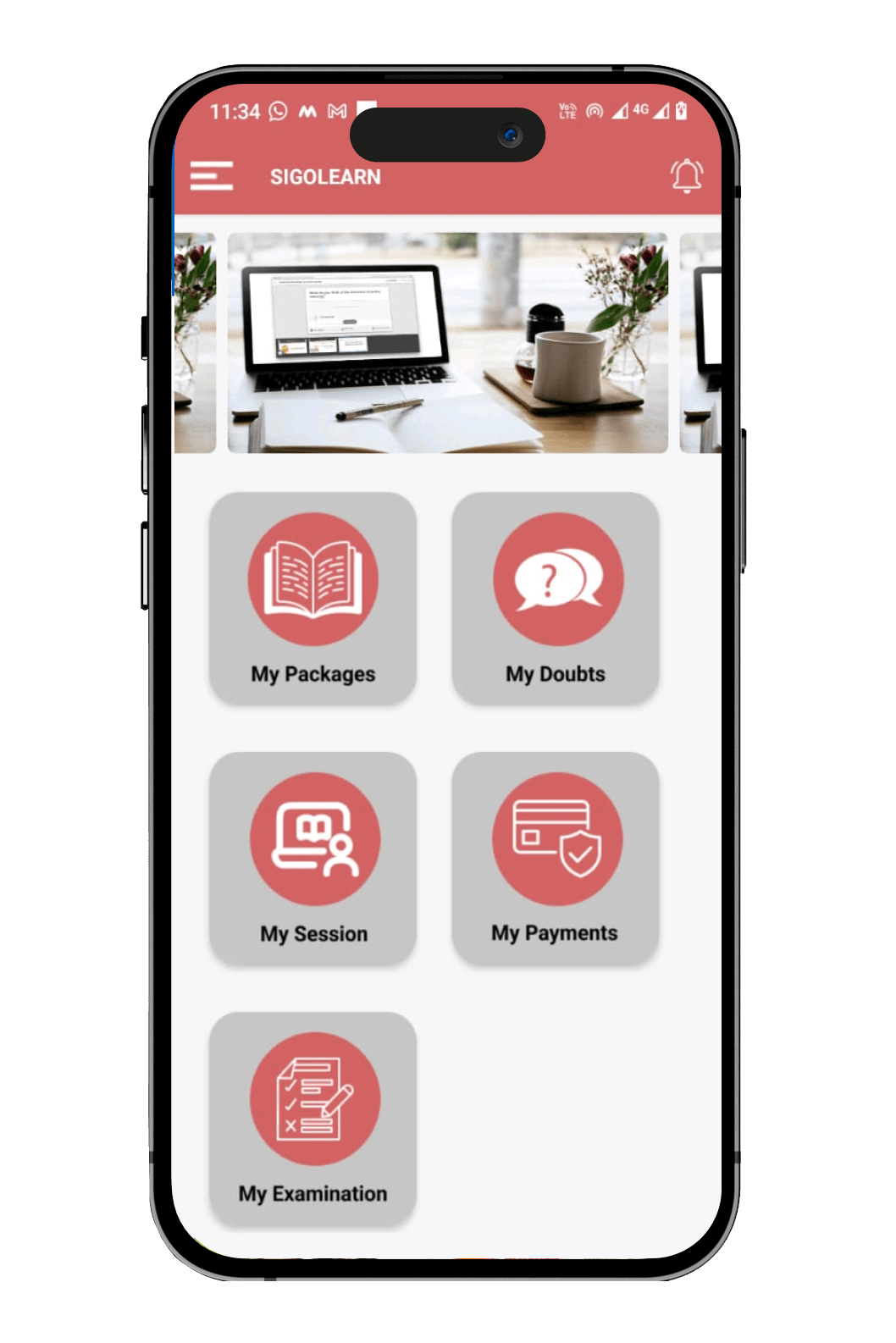
Student App
- Advance Login Panel And Student Dashboard
- Detailed Course/Syllabus Overview
- Anytime file sharing
- Recorded class accessibility
 Non-Restrictive Learning
The students can choose any course they wish to study at any time without any limitations.
Non-Restrictive Learning
The students can choose any course they wish to study at any time without any limitations.
 Easy Registration
The students can fill in their name, an email, a mobile number, and a password and sign-up for the app.
Easy Registration
The students can fill in their name, an email, a mobile number, and a password and sign-up for the app.
 Filter Courses
The students can use the filters to choose a course based on duration, price, class timings, levels, and more.
Filter Courses
The students can use the filters to choose a course based on duration, price, class timings, levels, and more.
 Browse Courses
There can be many courses available in the app from which the students can select what they wish to learn.
Browse Courses
There can be many courses available in the app from which the students can select what they wish to learn.
 Easy Search
The students can search for a particular course, subject, or tutor on the app.
Easy Search
The students can search for a particular course, subject, or tutor on the app.
 Wishlist
This wishlist can be used to add the courses that they want out of an e-learning program and can be used later.
Wishlist
This wishlist can be used to add the courses that they want out of an e-learning program and can be used later.
 Rating & Feedback
The ratings and feedback encourage downloads and build trust with people who use your app.
Rating & Feedback
The ratings and feedback encourage downloads and build trust with people who use your app.
 Leaderboard
Increasing the competition among the students or learners is a great way of motivating them and leaderboards are integrated into the app to do just that.
Leaderboard
Increasing the competition among the students or learners is a great way of motivating them and leaderboards are integrated into the app to do just that.
 Course Reminder
The students will be getting push notifications regarding the course timings.
Course Reminder
The students will be getting push notifications regarding the course timings.
 Customizable
The app can be published in the name of your brand.
Customizable
The app can be published in the name of your brand.
 Multiple Course Subscription
Students can select the course they want to learn and the subscription option helps them know the updates of the selected course.
Multiple Course Subscription
Students can select the course they want to learn and the subscription option helps them know the updates of the selected course.
 Quick Payment Gateway
Secure and reliable payment can be done quickly. This allows the user to send and receive cash making the transaction quick and simple.
Quick Payment Gateway
Secure and reliable payment can be done quickly. This allows the user to send and receive cash making the transaction quick and simple.
 Live and Recorded Classes
The students can attend the live sessions of the course they select as per the schedule.
Live and Recorded Classes
The students can attend the live sessions of the course they select as per the schedule.
 Study Materials for Each Session
This app consists of study materials and online exercises for each session. The students can download and use these materials offline also.
Study Materials for Each Session
This app consists of study materials and online exercises for each session. The students can download and use these materials offline also.
 Live Interactions
The students can interact with the instructors in the live sessions and clear their doubts.
Live Interactions
The students can interact with the instructors in the live sessions and clear their doubts.
 Online Exams
Once the student completes the course, they can attend slip tests, mock tests, FAQs, and written exams online.
Online Exams
Once the student completes the course, they can attend slip tests, mock tests, FAQs, and written exams online.
 Evaluation Reports
Once the students have completed the exams, the evaluated results will be sent to them and they can download the reports.
Evaluation Reports
Once the students have completed the exams, the evaluated results will be sent to them and they can download the reports.
 Review & Rating
Students can leave a rating or review about their experience on using the app.
Review & Rating
Students can leave a rating or review about their experience on using the app.
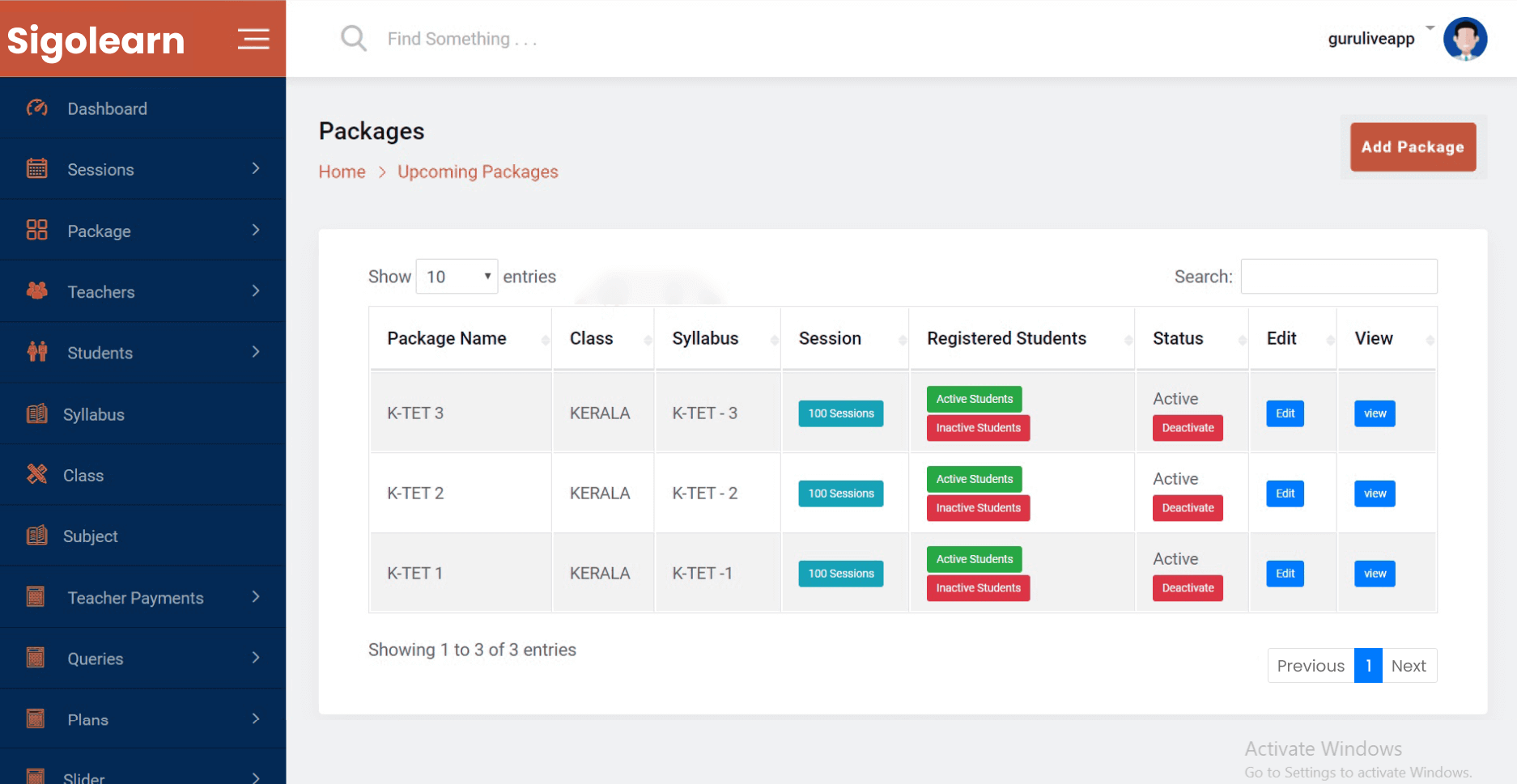
Admin App
- Advanced Admin Dashboard
- Push Notification & Alert Messages
- Student Analytics Report
- Overall Payment Statistic report
 Dashboard
The admin can easily access the functioning of the entire app through the dashboard.
Dashboard
The admin can easily access the functioning of the entire app through the dashboard.
 Monitor
The admin of the app can manage the activities of the students and the teachers.
Monitor
The admin of the app can manage the activities of the students and the teachers.
 Payment Management
The admin can check the payments completed and the pending status of the students and the teachers.
Payment Management
The admin can check the payments completed and the pending status of the students and the teachers.
 Class Management
The admin can manage the live sessions and the live chats of the students, teachers, and parents.
Class Management
The admin can manage the live sessions and the live chats of the students, teachers, and parents.
 Advertisement Management
The admin can upload and reject advertisements regarding the new course modules.
Advertisement Management
The admin can upload and reject advertisements regarding the new course modules.
 Custom Notifications
The admin can send a push notification to the app users regarding the updates in the app.
Custom Notifications
The admin can send a push notification to the app users regarding the updates in the app.
 Generate Reports
The admin can get the reports of the app users on how much time they have spent on the app online and offline.
Generate Reports
The admin can get the reports of the app users on how much time they have spent on the app online and offline.
 Manage Users
Admin panel helps the teachers, parents, and students to log in, edit their details and view their course history.
Manage Users
Admin panel helps the teachers, parents, and students to log in, edit their details and view their course history.
 Manage Packages
Admin can manage the course packages based on the subscriptions done by the students, parents, and teachers.
Manage Packages
Admin can manage the course packages based on the subscriptions done by the students, parents, and teachers.
 Manage Class & Syllabus
The admin can check how many students are there in a course, track the ongoing and upcoming syllabus, and add the syllabus.
Manage Class & Syllabus
The admin can check how many students are there in a course, track the ongoing and upcoming syllabus, and add the syllabus.
 Manage Subjects
The admin can manage courses and subjects offered by the institution.
Manage Subjects
The admin can manage courses and subjects offered by the institution.
 Exam Management
The admin can manage the assessments, quizzes, and tests given by the institutions.
Exam Management
The admin can manage the assessments, quizzes, and tests given by the institutions.
 Manage Queries
The admin can assign the teachers to respond to student’s or parent’s queries.
Manage Queries
The admin can assign the teachers to respond to student’s or parent’s queries.
 Manage Slider
The admin can manage the slider and control the home screen of the app.
Manage Slider
The admin can manage the slider and control the home screen of the app.
 Push Notifications
The admin can update teachers and students with the upcoming events, such as exams, the launch of any course, and more.
Push Notifications
The admin can update teachers and students with the upcoming events, such as exams, the launch of any course, and more.
 Settings
The admin can manage the account details of the students, teachers, and parents synched to the app and notify them to change at any time if needed.
Settings
The admin can manage the account details of the students, teachers, and parents synched to the app and notify them to change at any time if needed.
 Manage Sections
The admin can manage the classes and courses allocated for the students.
Manage Sections
The admin can manage the classes and courses allocated for the students.
 Content Management
The admin can manage the content uploaded in the app.
Manage Reviews
The admin can manage the reviews left by the app users.
Content Management
The admin can manage the content uploaded in the app.
Manage Reviews
The admin can manage the reviews left by the app users.
 Attendance Management
The admin can view the attendance of the students and lecturers during the course time.
Attendance Management
The admin can view the attendance of the students and lecturers during the course time.
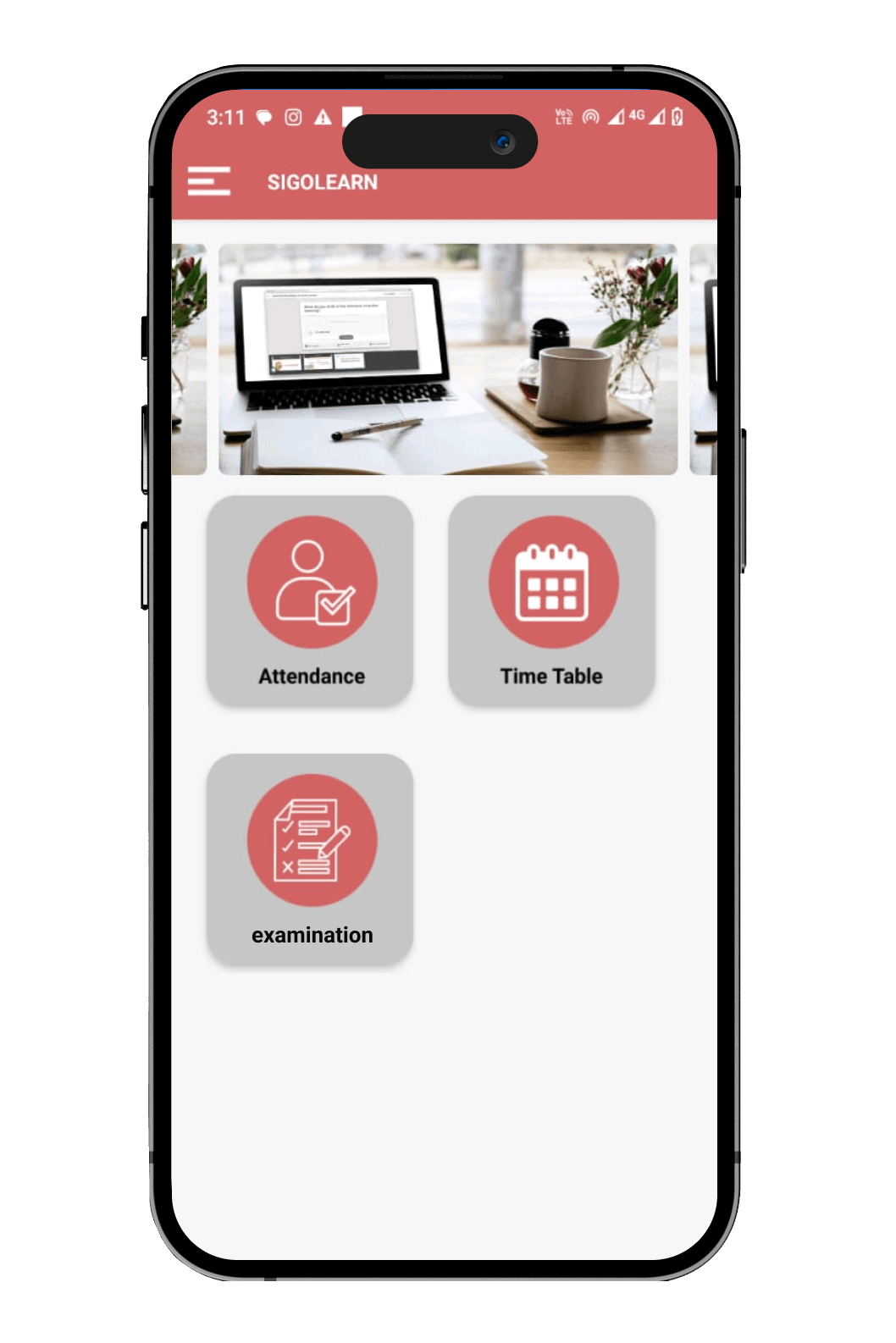
Parents App
- Easy view of attendance Report
- Student Performance Analysis
- Live chat with teachers
- Overall view on timetable & sessions
Sign Up
The sign-in page is the initial process to get into the application, and we have made the processes of registration and authorization simple. Once the admin approves the request, parents can start using the app.
 View Status and Reports
The parents can view the results of their kid’s scores in the assessments and the number of sessions attended by the students on a daily basis. This helps them to monitor their kids anytime.
View Status and Reports
The parents can view the results of their kid’s scores in the assessments and the number of sessions attended by the students on a daily basis. This helps them to monitor their kids anytime.
 Timetable
The parents can view the timetable of the daily schedules and help their children learn according to the schedules.
Timetable
The parents can view the timetable of the daily schedules and help their children learn according to the schedules.
 Attendance
The parents can view the attendance of their kids.
Attendance
The parents can view the attendance of their kids.
 Communication
The parents can communicate with the teachers and discuss the opinions they have on the students.
Review & Rating
The parents can leave a rating or review about the experience of using the app.
Communication
The parents can communicate with the teachers and discuss the opinions they have on the students.
Review & Rating
The parents can leave a rating or review about the experience of using the app.
Demo
Student
Mobile:7994294972
Password:test2020
Parents
Mobile:1234567890
Password:test2020
FAQ
Ans.
We specialise in developing mobile and web-based e-learning applications including: live/recorded video classes, interactive quizzes and assessments, student-teacher communication features, file sharing & resource libraries, progress tracking dashboards, and more.
Ans.
A: Project timelines vary depending on features, platforms (iOS/Android/web), integrations (e.g., LMS, payment gateways), and design complexity. As a rough range: a basic app may take 2-4 weeks, whereas a fully featured platform might take 1-2 months or more.
Ans.
Yes we can integrate your e-learning app with existing LMS platforms, CRMs, user authentication systems, payment gateways, and other backend services to ensure seamless operation and data synchronisation.
Ans.
Absolutely. We build apps with localisation support multi-language interfaces, region-specific content, and even offline modes if required for lower-connectivity areas.
Ans.
Common monetisation models include subscription plans (monthly/annual), one-time course purchases, freemium (basic free access + premium features), in-app purchases, certification/credential fees, and corporate/enterprise licensing. We’ll guide you toward the model that fits your audience.
Ans.
We follow an agile process with prototyping, testing (including usability, performance, security), and modular architecture so your app can scale as your user base grows. We also ensure compliance with relevant data-protection standards.
Ans.
Yes. Depending on your budget and roadmap, we can include advanced features such as live streaming classrooms, AR/VR interactive modules, AI-based personalised learning paths, and analytics dashboards to track learner behaviour.
Ans.
After launch, we provide support services including bug fixes, version updates, server maintenance, new feature roll-outs, and monitoring. We can also offer a service contract tailored to your needs (e.g., 24/7 support, periodic enhancements).
Ans.
Cost depends on several factors number of platforms (iOS/Android/web), complexity of features (live video, AR/VR, AI, multi-tenant capability), integrations, design requirements, and scale. We can provide a detailed quote once we understand your requirements.
Ans.
Simple: reach out to us via our contact page, share your basic concept and requirements, we’ll schedule an initial consultation, provide an estimate, scope a prototype (MVP), and plan your development roadmap accordingly.