
ABHA integration lets your telemedicine app create or verify a patient’s Ayushman Bharat Health Account and link consultation records to it. Full ABDM integration goes further: your app shares records with other providers when the patient consents (as a Health Information Provider) and fetches records from them (as a Health Information User). The National Health Authority certifies this in milestones, M1 to M3, after testing in the ABDM sandbox.
Quick answer
- M1: create and verify ABHA, accept Scan & Share at registration.
- M2: act as a Health Information Provider and link care contexts.
- M3: act as a Health Information User and fetch records with consent.
- Build on the current V3 APIs, in the sandbox first.
- Expect a security audit before production access.
Why ABHA integration matters for telemedicine in 2026
ABHA is now the default health ID for a large share of Indian patients. On 10 July 2026, the Health Ministry reported more than 93.95 crore ABHA numbers and over 105 crore linked health records. In April 2024, the ABDM dashboard figure cited by the Health Secretary was 5,894.60 lakh, or about 58.95 crore.

Provider adoption is growing too. By the same July 2026 update, 5.33 lakh facilities and 9.85 lakh professionals were on the national registries, and around 2.72 lakh facilities had adopted ABDM-enabled software.

For a telemedicine app, this means patients increasingly expect to share past records by consent, and hospital clients increasingly expect certified ABDM integration, especially those empanelled under AB PM-JAY.
The ABDM milestones
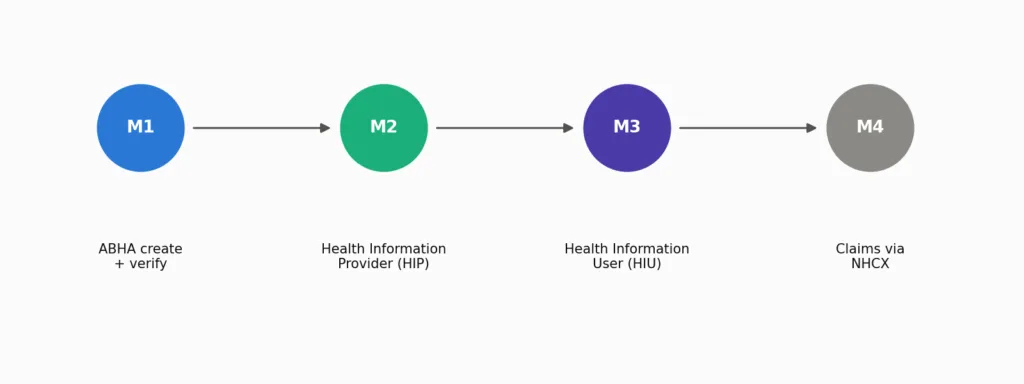
M1: ABHA.
Your app creates new ABHA numbers, verifies existing ones and links the patient profile. It also accepts Scan & Share, where a patient scans a facility QR code to send their details. A developer knowledge base on the ABDM sandbox recommends shipping M1 first and getting it working in real use before chasing M3.
M2: Health Information Provider (HIP).
After each teleconsultation, your app creates a care context and links it to the patient’s ABHA. When another provider asks, with the patient’s consent, your app responds with an encrypted FHIR bundle. Record structures follow the NRCES FHIR profiles used by ABDM.
M3: Health Information User (HIU).
Your doctors can request a patient’s records from other ABDM-connected facilities. After the patient approves, the app fetches and displays them.
M4: claims.
Integration guides describe a fourth milestone for digital insurance claims through the National Health Claims Exchange (NHCX). The same source notes that V3 is the current API standard and earlier versions are legacy.
How the consent flow works
The part that surprises most teams: in ABDM, your server is not just a client calling an API. The gateway calls you back.

- Your doctor, acting as HIU, raises a consent request through the ABDM gateway.
- The patient approves it in their PHR app, choosing record types and a time window.
- The gateway notifies the provider holding the records (the HIP).
- The HIP sends an encrypted FHIR bundle to your app, which decrypts and shows it.
Your backend must expose callback endpoints, handle asynchronous responses and keep an audit trail of every consent and data transfer.
A telemedicine consultation with ABHA

In a typical flow, the patient registers with Scan & Share or enters their ABHA, the doctor consults on video, and the e-prescription is generated. One Indian hospital software guide notes that the e-prescription should be pushed back to the patient’s ABHA-linked records. Your app links a care context for that consultation so the patient can see it in their PHR app and share it later.
From the ABDM sandbox to production
Development starts in the ABDM sandbox. Public integrator guides describe a similar path to production. Confirm the current steps on the official ABDM site, because NHA updates them.

- Register for sandbox access and receive client credentials.
- Build M1, then M2, then M3 against the sandbox.
- Pass the NHA’s functional test cases for each milestone.
- Complete a security audit. Integration guides describe a Safe-to-Host certificate from a STQC or CERT-In empanelled agency.
- Submit the reports for review.
- Receive production credentials, register facilities on the Health Facility Registry, and go live.
Certification applies to the software. Each facility using it still registers separately.
Data protection around ABDM
ABDM integration handles identifiable health data, so the DPDP Act applies as well as ABDM’s own policies. Health data processed within the ABDM ecosystem must be stored in India. Encrypt data in transit and at rest, and log every consent and access. Our guide to secure cloud architecture for telemedicine apps covers the controls, and our article on the DPDP Act for healthcare apps covers consent and breach rules.
Common mistakes
- Starting with M3.
Get ABHA creation and verification working in real use first. - Treating ABDM as outbound only.
The gateway calls your endpoints; they must be reachable and reliable. - Building on legacy API versions.
New work should target V3. - Over-sharing records.
Send only the care contexts and time window the patient approved. - Leaving the security audit to the end.
Audit findings can force architecture changes. - Hosting ABDM data outside India.
FAQ
What is ABHA integration?
It lets your app create or verify a patient’s ABHA number and link their records to it, which is ABDM milestone M1.
What is the ABDM sandbox?
The test environment where developers build and test ABDM features before applying for production access.
How long does ABDM integration take?
It depends on your starting point. Integrators publish estimates ranging from 8 to 12 weeks with a specialist partner to 5 to 10 months for a custom build from scratch. Treat these as vendor claims, not benchmarks.
Does a telemedicine app need M2 and M3?
M1 enables ABHA only. Sharing consultation records needs M2, and viewing records from other providers needs M3.
Sources
- IBEF: ABDM crosses 93.95 crore ABHA IDs (July 2026)
- Deccan Herald: ABHA IDs as of April 2024
- HealthAtoms: The ABDM sandbox and gateway
- Nirmitee: ABDM M1 to M4 milestones guide
- IGNEK: ABDM milestones and certification
- Medical365: Telemedicine in India guide
- ABDM sandbox · ABDM official site
Related reading: Telemedicine app development guide
